
Have you ever found yourself staring at the back of an old computer, trying to figure out what cable goes where? Or maybe you’ve been searching for a new monitor cable and seen two different names—D-sub and VGA. Are they the same things? It’s a common point of confusion for many people, and it’s easy to see why. These 2 terms are often used interchangeably, leading to frustration and, sometimes, buying the wrong cable.
But here’s the key takeaway: while all VGA connectors are a type of D-sub connector, not all D-sub connectors are VGA. Think of it like this: all apples are fruits, but not all fruits are apples. Understanding this simple relationship is the key to demystifying these two connectors and making sure you always have the right cable for the job.
In this article, we’ll break down the differences between D-sub and VGA connectors, explore their unique characteristics, and provide a clear comparison so you can confidently choose the right connector every time.
What is a D-Sub Connector?
To understand VGA, you first need to understand its parent category: the D-subminiature, or D-sub connector.
A D-sub connector isn't a single type of plug; it's a family of connectors defined by a specific physical design. The "D" in D-sub comes from the distinct D-shaped metal shell that surrounds the pins. This shape serves a crucial purpose: it ensures the connector can only be plugged in one way, preventing bent pins and incorrect connections.

Related Post:
What is D-Sub? A Comprehensive Guide to D-Sub Connectors
Based on the pin arrangement, D-sub connectors can be categorized into standard D-sub connectors, high-density D-sub connectors, and combo D-sub connectors.
- Standard D-sub connectors have pin counts of 9, 15, 25, 37, and 50.
- High-density D-sub connectors have pin counts of 15, 26, 44, 62, and 78.
The VGA connector is a high-density 15-pin D-sub or HD15 connector.
The naming convention for D-sub connectors is also quite straightforward once you know the code. The name usually consists of a letter followed by a number, like DB25 or DE9. The second letter indicates the shell size (E, A, B, C, and D), while the number refers to the total pin or socket count.
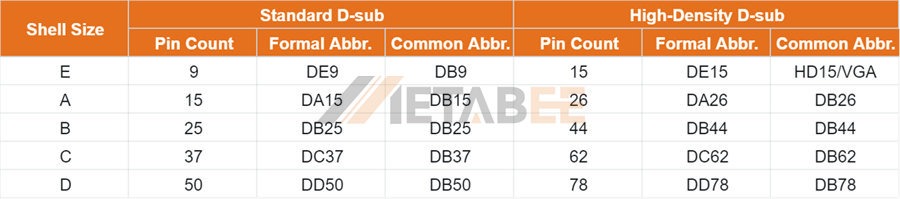
This naming system highlights the incredible versatility of the D-sub family. These connectors have been used for decades in a wide range of applications, from computing to industrial equipment. For example, you might be familiar with the DE9 connector, which was widely used for serial ports on older computers, connecting devices like modems and mice. Another common type is the DB25, which was the standard for parallel ports, used for connecting printers.
The D-sub family is the ultimate generalist. It’s a robust, reliable design that can be configured for almost any purpose, which is precisely why it was adopted for video signals—giving birth to the VGA connector.
What is a VGA Connector?
While the D-sub is a family of connectors, VGA (Video Graphics Array) is a specific member of that family. It's a specialist, built with one job in mind: transmitting analog video signals.
The VGA connector is technically a DE15 or, more commonly, an HD15 connector. It fits the D-sub criteria perfectly: it has the D-shaped shell and is a subminiature connector. However, it is uniquely configured for video. The 15 pins are arranged in 3 rows, and each pin is assigned a specific role. These pins are responsible for carrying the red, green, and blue (RGB) color signals, as well as horizontal and vertical synchronization signals.
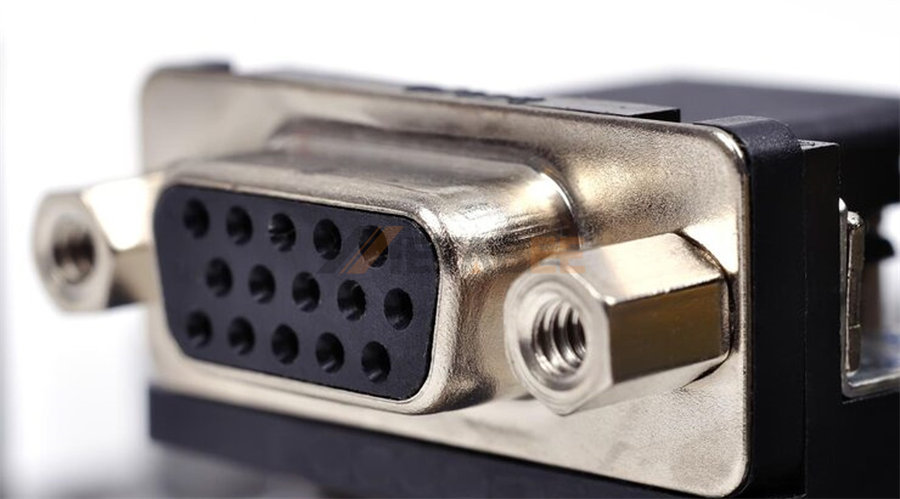
Introduced by IBM in 1987, the VGA standard was a groundbreaking development that became the default for PC graphics. For decades, it was the standard way to connect a computer to a monitor. The VGA connector’s purpose is to take the analog video signal from a graphics card and transmit it directly to the monitor's display.
However, as technology has evolved, so have video standards. Digital interfaces like HDMI, DVI, and DisplayPort have almost completely replaced VGA. These newer standards can transmit higher resolutions and refresh rates and also carry audio, something VGA cannot do. Despite this, VGA connectors are still found on many older devices and are sometimes included on modern motherboards to maintain backward compatibility.
Key Differences between D-sub and VGA
Comparison Table
To make things even clearer, let's put the key differences side-by-side in a table. This is the simplest way to visualize the relationship between the general D-sub family and its video-specific member, the VGA connector.
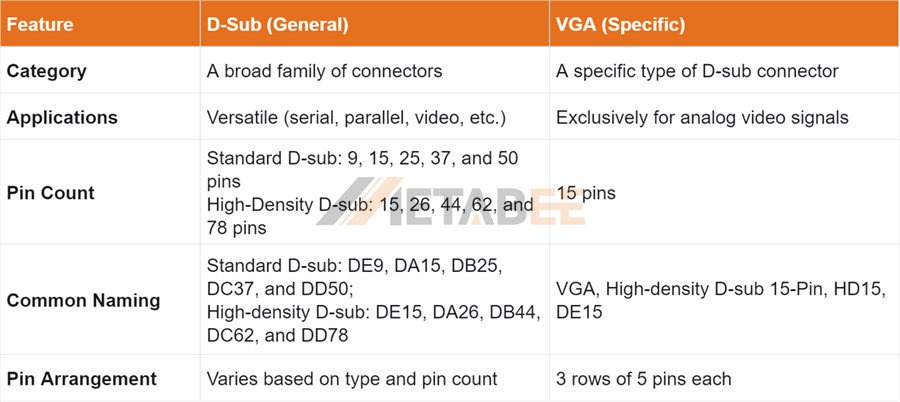
This table neatly summarizes the core distinction: D-sub is a category, while VGA is a specific implementation within that category.
You'll notice that the table includes DA-15 under the D-sub category. This is another example of a 15-pin D-sub connector, but it has a different shell size and pin arrangement than a VGA connector, which is what makes the distinction so important. For example, a DA-15 was famously used for older Apple monitors and for joystick ports on sound cards. This further proves that just because a D-sub connector has 15 pins doesn’t mean it's a VGA connector.
The Crucial Takeaway: It's All About Context
Now we get to the heart of the matter and the source of all the confusion. The terms "D-sub" and "VGA" are often used interchangeably in everyday conversation, but this can be misleading. When someone refers to a "D-sub cable" in the context of connecting a computer to a monitor, they are almost certainly talking about a VGA cable. The term "D-sub" has simply become a shorthand for the D-shaped, 15-pin video connector.
However, from a technical perspective, it's more accurate to say that a VGA connector is a DE-15 or HD15 (high-density 15-pin D-sub) connector. This is the crucial distinction. A DE-15 connector could, theoretically, be used for other things, but its widespread adoption for video has cemented the "VGA" name in the public consciousness.
So, when you're shopping for a cable or trying to connect a device, what should you do? The best practice is to look for the specific designation VGA or HD15. These names leave no room for doubt; they tell you that the cable is designed to carry the specific analog video signals that a computer monitor requires. Relying solely on the term "D-sub" could lead you to purchase a connector with the wrong pin arrangement or one designed for a completely different application, like an old serial port.
Here’s a simple analogy to keep it straight: The D-sub family is like the "sports car" category, which includes everything from F1 racers to classic muscle cars. The VGA connector is like a "Ferrari" within that category—a specific, well-known type of sports car. You wouldn't call a Lamborghini a Ferrari, even though they're both sports cars. Similarly, you shouldn't call a serial port connector a VGA connector, even though they're both D-sub connectors.
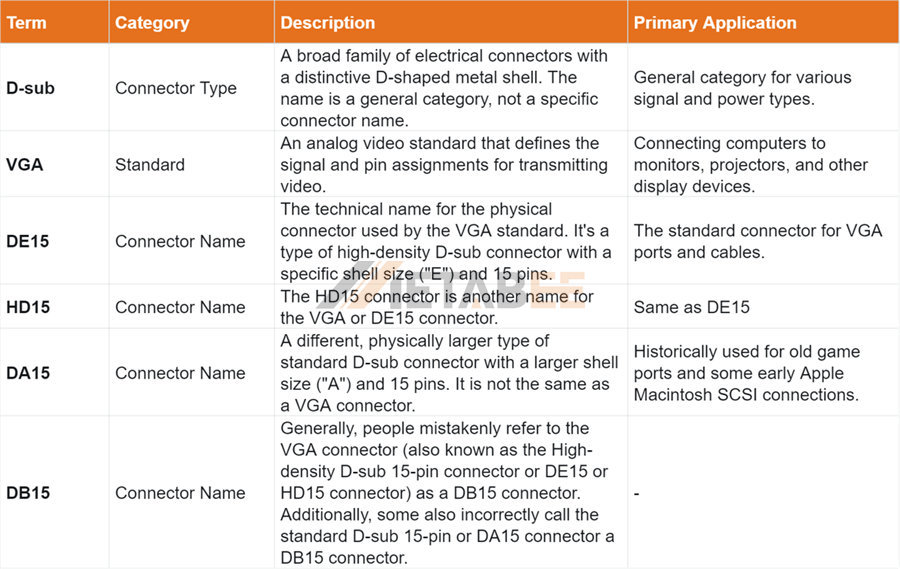
Don’t be Confused by Names: D-sub vs. VGA vs. DE15 vs. HD15 vs. DA15 vs. DB15
Do you often get confused by these names and are unsure what they actually refer to? I've created a comparison table to help clarify these terms for you.
Conclusion: VGA Is a D-Sub, But D-Sub Isn't Always VGA
By now, the distinction should be much clearer. D-sub is the broad, encompassing category of connectors defined by a D-shaped metal shell and a specific pin-numbering system. VGA is a specific, high-density 15-pin D-sub connector that has been standardized for transmitting analog video signals.
For the average user, the most important thing to remember is that when you're dealing with monitors, projectors, or graphics cards, the term "D-sub" is usually a casual synonym for a VGA connector. However, understanding the technical difference can save you from making a costly mistake if you ever encounter older or more specialized equipment.
Armed with this knowledge, you can now confidently navigate the world of connectors. You'll know that the VGA cable you're looking for is a specific type of D-sub and that simply searching for "D-sub" isn't enough. You can make an informed choice, ensure your devices are correctly connected, and get back to what you were doing, all without the confusion.
We hope this article has provided a clearer picture of the relationship between these two ubiquitous connectors. If you have any questions or personal stories about D-sub and VGA connectors, feel free to share them in the comments below!
Related Products
FAQs
Q: Is a D-Sub connector the same thing as a VGA connector?
A: NO. While the terms are often used interchangeably, they are not the same thing. D-Sub (or D-subminiature) is the name of a family of connectors characterized by their D-shaped metal shield. VGA is a specific type of video interface that uses a 15-pin D-Sub connector (specifically, a DE-15 connector) to transmit analog video signals. So, every VGA connector is a D-Sub connector, but not every D-Sub connector is a VGA connector.
Q: Why is my monitor port labeled "D-Sub"?
A: The manufacturer is using the technical term for the physical connector. When you see a "D-Sub" port on a monitor or computer, it means it is a VGA port for connecting a monitor. This is because the VGA standard is the most common application of a high-density 15-pin D-Sub connector for video.
Q: What kind of signal does a VGA connector carry?
A: VGA connectors used for monitors carry an analog video signal. This is a key difference from modern connections like HDMI or DisplayPort, which transmit digital signals.
Q: Can a VGA connection carry audio?
A: No, a standard VGA/D-Sub connection does not carry audio. It is designed for video signals only. To get audio from a computer to a monitor or speakers, you need a separate audio cable (e.g., a 3.5mm headphone jack or an optical cable) or a different type of video cable like HDMI or DisplayPort.
Q: What are the limitations of a VGA/D-Sub connection?
A: The main limitation is its analog signal type. This makes the signal susceptible to interference and can result in a lower-quality image, especially at higher resolutions or with longer cables. Modern digital connections like HDMI and DisplayPort offer better clarity and can support higher resolutions and refresh rates without signal degradation.
Q: Can I connect a modern device (like a new laptop) to an older monitor with a VGA port?
A: Yes, you can. You will need an adapter or a special cable. For example, if your new laptop has an HDMI port, you would need an "HDMI to VGA" adapter. Since the signals are different (digital vs. analog), these adapters actively convert the signal, which can sometimes result in a slight loss of quality.
Q: What's the maximum resolution and refresh rate a VGA connection can support?
A: VGA connections can theoretically support resolutions up to 1920x1080 (1080p).
Q: Why are VGA and D-Sub connections still used today?
A: They are still common in several key areas. Legacy hardware is the biggest reason—many older computers, monitors, and projectors still rely on this standard. Additionally, they are reliable and cost-effective for basic display tasks, which is why they can still be found in some industrial, educational, and corporate settings.
