
Ever wondered what those nine pins on the back of your old computer or industrial equipment are for? You've likely encountered a DB9 connector, a classic component of the D-subminiature (D-sub) connector family. For decades, the DB9 was the go-to standard for serial communication, forming the backbone of connections between computers and various peripherals.
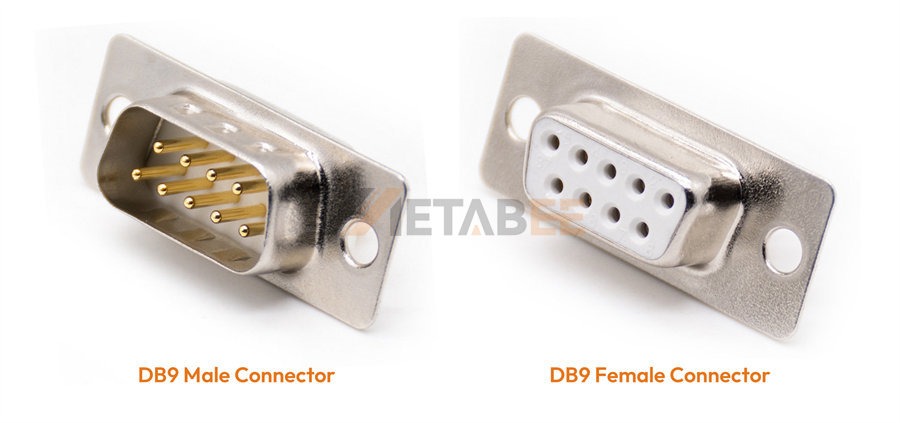
Metabee DB9 Male and Female Connectors
While modern technologies like USB have taken over for most consumer applications, the DB9 connector remains critically important in many specialized and legacy systems. This guide will demystify the DB9 pinout, explain what each pin does, and help you understand its common applications.
The RS232 DB9 Pinout Diagram
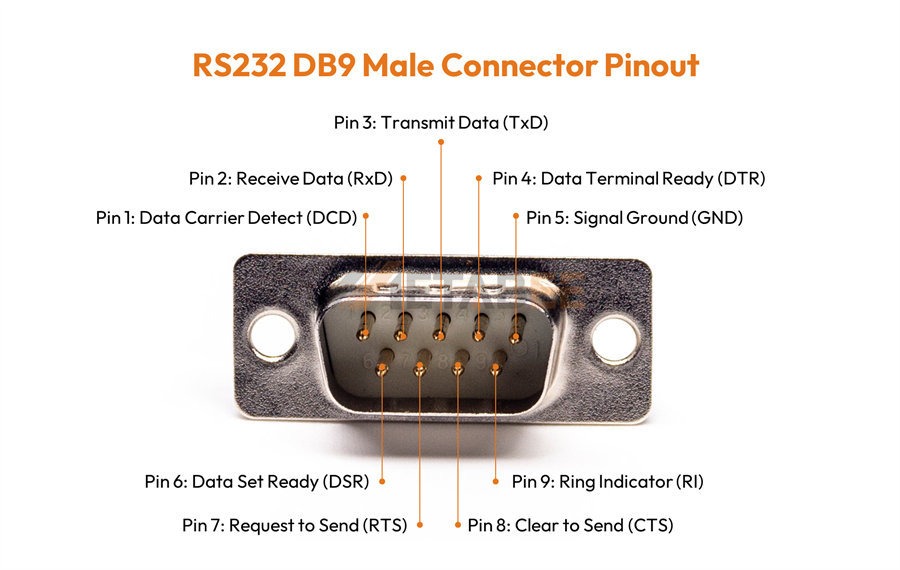
Understanding the pinout is the first step to working with a DB9 connector. Standard male and female RS232 DB9 connectors are shown below, with pin numbers assigned for clarity. The pin numbering is often difficult to see on the physical connector, so it's essential to refer to a reliable diagram.
The pinout for both male and female RS232 DB9 connectors is as follows:
RS232 DB9 Male Connector Pinout
RS232 DB9 Female Connector Pinout
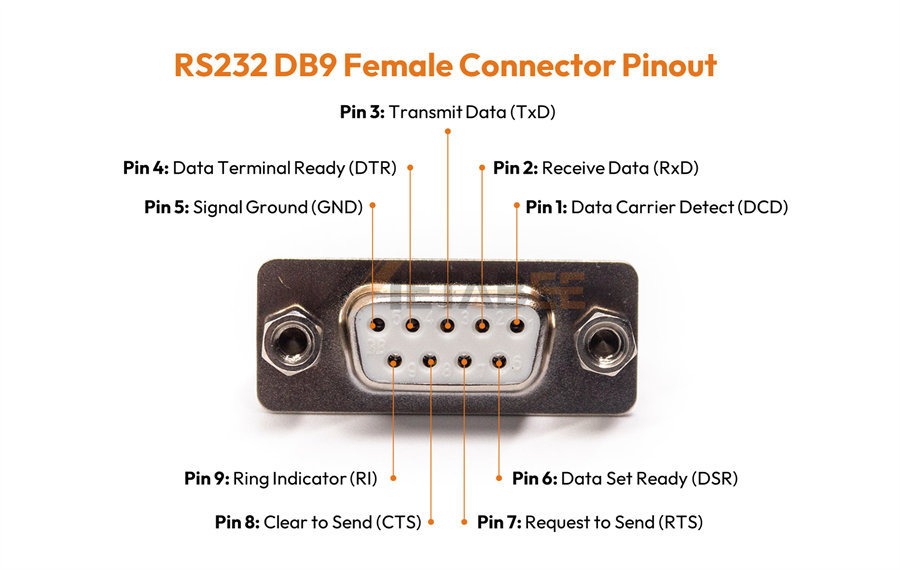
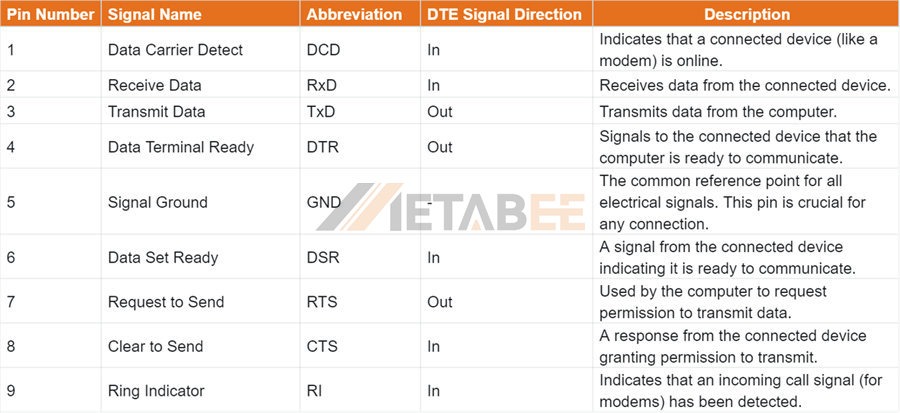
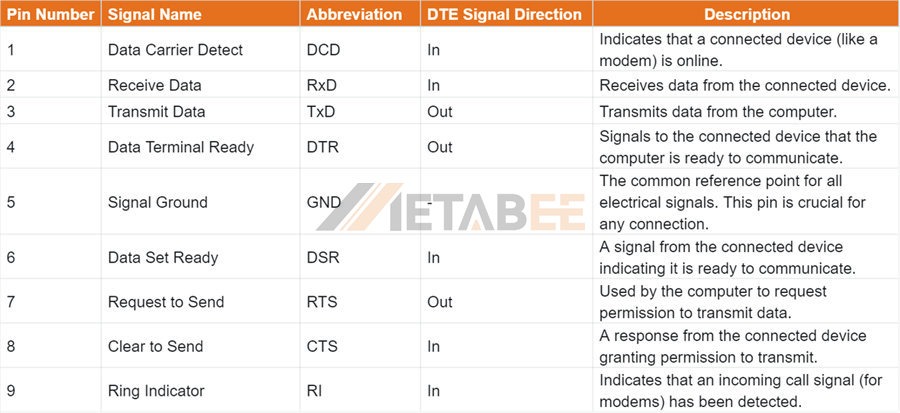
Table of DB9 Connector Pinout
This table provides a mapping of pin numbers to their respective signal names and designates the signal direction for each.
Beyond the Basics: Understanding Pin Roles
To truly understand how a DB9 connection works, you need to think about the roles of the pins in terms of signal flow. The "Big 3" are the most essential pins for basic two-way communication:
- TxD (Transmit Data): This is the pin the computer uses to send information to the connected device.
- RxD (Receive Data): This is the pin the computer uses to receive information from the connected device.
- GND (Signal Ground): This pin provides a common electrical reference point. Without it, the TxD and RxD signals wouldn't be correctly interpreted.
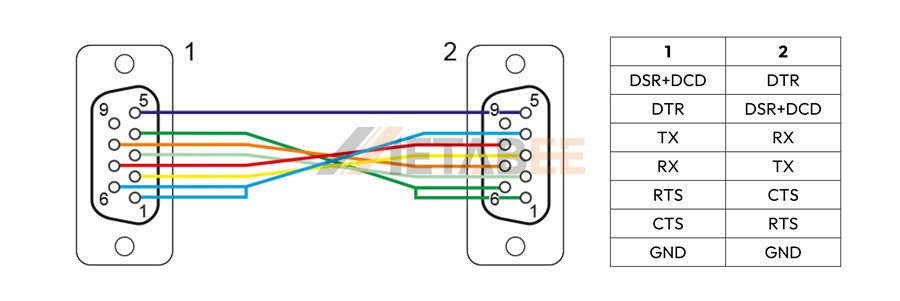
For more reliable communication, especially over longer distances, the concept of hardware handshaking comes into play. Pins like RTS/CTS (Request to Send/Clear to Send) and DTR/DSR (Data Terminal Ready/Data Set Ready) are used to prevent data loss. The computer uses RTS to ask for permission to send data, and the device responds with CTS to grant it. This ensures that the receiving device is ready before data is transmitted.
Color Codes and Wiring Diagrams of DB9 Cable Assemblies
The RS-232 standard categorizes serial devices into two primary types: Data Terminal Equipment (DTE) and Data Communications Equipment (DCE). A DTE device is typically your computer, terminal, or any device that originates data. A DCE device, such as a modem, is responsible for transmitting that data over a communication line.
Choosing the right cable is critical for a successful connection. Your choice depends entirely on the devices at each end:
Straight-Through DB9 Serial Cables
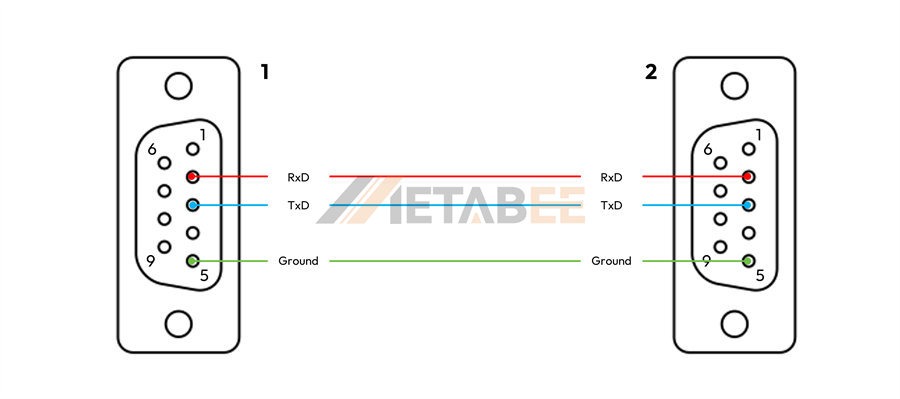
Straight-through DB9 serial cables are used to connect a DTE device to a DCE device. It links each pin directly to its corresponding pin on the other end, allowing the naturally aligned transmit and receive signals to pass through.
Here is a typical wiring diagram and corresponding color code for a straight-through DB9 serial cable:
Simple Straight-Through Cable
RS232 DB9 Null Modem Cables
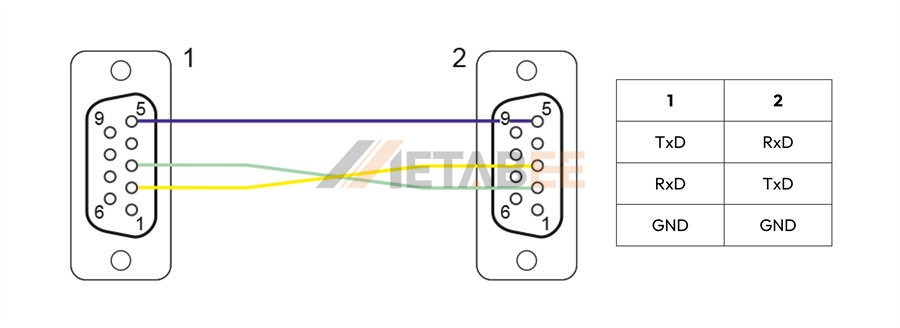
RS232 DB9 null modem cables are a kind of "crossover" cable used to connect two DTE devices directly to each other. It effectively swaps the transmit (TxD) and receive (RxD) pins, ensuring that one device's transmitted data is received by the other.
Simple Null Modem Cable
Classic Null Modem Cable
Null Modem Cable with Full Handshake
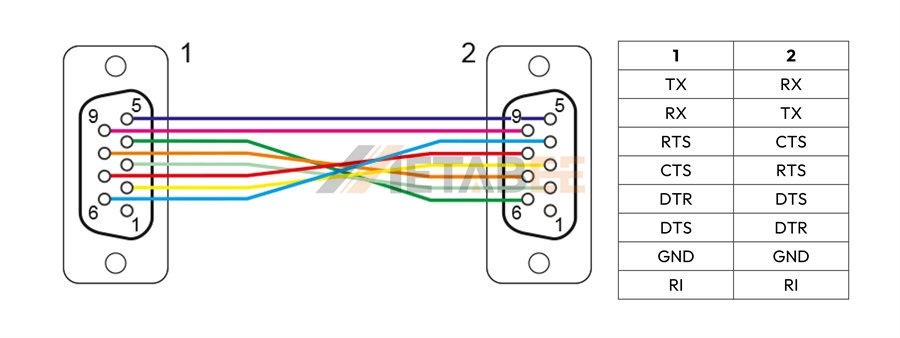
Using the wrong cable type is a common cause of communication failure. Always check your devices to determine which cable is needed.
Common Applications of DB9 Connectors
The most common and historically significant application of DB9 connectors is in the RS-232 serial communication standard. This standard governs the way data is transmitted sequentially, one bit at a time. This simplicity made it ideal for a wide range of devices.
There are 4 typical use cases for the DB9 connector:
- PC to Peripherals: In the past, DB9 was the primary way to connect devices like modems, older printers, and serial mice to personal computers.
- Industrial Automation: It's still widely used for connecting control systems, programmable logic controllers (PLCs), and other industrial machinery where reliability and simplicity are paramount.
- Networking Equipment: Many routers and network switches have a DB9 console port for command-line access and configuration.
- Debugging and Diagnostics: The port is often used by technicians and engineers to connect to embedded systems, medical equipment, and other specialized devices for troubleshooting.
Troubleshooting and Tips for Working with DB9
Working with DB9 can be tricky, especially for beginners. Here are some common mistakes and practical tips:
Male vs. Female
Be careful not to confuse male (pins) and female (holes) connectors. The pinout is the same, but you need to ensure you have the correct gender for your cable.
Straight-through vs. Null Modem
A straight-through cable connects each pin to the corresponding pin on the other side (1 to 1, 2 to 2, etc.). A null modem cable, used for direct computer-to-computer connections, swaps the TxD and RxD pins (Pin 2 to Pin 3, Pin 3 to Pin 2) so that data sent from one computer is received by the other.
Missing Ground
A missing or faulty ground connection is a frequent cause of communication failure. Always ensure Pin 5 is properly wired.
Practical Advice
A multimeter is your best friend when working with DB9. Use it to check for continuity between the pins on both ends of your cable to confirm the correct wiring.
Conclusion: The Legacy of a Standard
The DB9 pinout is more than just a relic of the past; it's a testament to a robust and reliable communication standard that continues to serve specific needs today. While USB and Ethernet have become dominant, the DB9's simplicity and durability ensure its continued relevance in a wide array of industrial and legacy applications.
Whether you're a seasoned engineer or a hobbyist tinkering with old hardware, a solid understanding of the DB9 pinout is an invaluable skill. Do you have any experiences with DB9 connectors? Share your stories or ask questions in the comments below!
Related Products
FAQs
Q: What is the difference between a male and a female DB9 connector?
A: A male DB9 connector has nine protruding pins, while a female DB9 connector has nine matching holes. The male connector typically plugs into the female connector. The pinout (the function of each pin) remains the same regardless of gender.
Q: Is a DB9 connector the same as a DB25 connector?
A: No, they are different but belong to the same D-subminiature family. A DB9 has 9 pins and is primarily used for serial communication. A DB25 has 25 pins and was also used for serial communication but more commonly for parallel ports on older computers.
Q: What is the main purpose of a DB9 connector today?
A: While it has been replaced by USB in most consumer products, the DB9 connector is still widely used in industrial automation, networking equipment (for console ports), and specialized scientific or medical devices where a simple, reliable serial connection is required.
Q: What are the "Big 3" pins in DB9 connectors and why are they so important?
A: The "Big 3" are the most essential pins for basic two-way communication: TxD (Transmit Data), RxD (Receive Data), and GND (Signal Ground). TxD sends data, RxD receives it, and GND provides a crucial common electrical reference point for the signals to be correctly interpreted.
Q: What is the difference between a straight-through and a null modem cable?
A: A straight-through cable connects each pin to its corresponding pin (e.g., pin 2 to pin 2). It's used to connect different types of devices (DTE to DCE, like a computer to a modem). A null modem cable crosses the transmit and receive lines (pin 2 to pin 3) and is used to connect two of the same type of devices (e.g., two computers) directly.
Q: What is "hardware handshaking" and which pins are used for it?
A: Hardware handshaking is a method used to control the flow of data and prevent data loss. It uses pins like RTS (Request to Send) and CTS (Clear to Send) for a device to ask for and receive permission to transmit data.
Q: Why is the Signal Ground (GND) pin so important?
A: The Signal Ground pin (Pin 5) provides a common electrical reference for all other signals. Without a proper ground connection, the voltage levels of the data signals (like TxD and RxD) cannot be reliably measured, leading to communication errors.
Q: What does "RI" stand for and what is its function?
A: "RI" stands for Ring Indicator. This pin was primarily used with modems and would signal to the connected computer that an incoming telephone call was detected.
Q: Can I connect a DB9 port to a USB port?
A: Yes, but you will need a USB-to-Serial adapter. This device converts the electrical signals and protocols of the USB connection into the RS-232 serial format that the DB9 port understands.
Q: How can I troubleshoot a faulty DB9 connection?
A: First, check that you are using the correct cable type (straight-through or null modem). Next, ensure the ground pin (Pin 5) is properly connected. A multimeter is a useful tool to check for continuity between pins on both ends of the cable to confirm proper wiring.
