
When building a stable, high-speed network environment, every detail matters. Many people invest significant time and budget upgrading their routers and network cables, but often overlook the connector at the end of the cable—the RJ45 connector. Not sure whether to use a shielded or unshielded RJ45 connector? Learn how the metal shell works, when grounding matters, and which type fits your environment.
Choosing the wrong connector will not only waste your money but can also cause network latency, packet loss, or even take down your entire network. For those looking for premium, industrial-grade reliability, starting with a trusted supplier like Metabee ensures that your physical layer is built to last. This article will dive deep into the core differences, working principles, and compatibility of shielded and unshielded RJ45 connectors, helping you make the right choice once and for all.
What is an RJ45 Connector?
To start with the basics, let's establish a baseline. An RJ45 connector is the standard physical interface used for Ethernet networking, typically found at both ends of a network cable to connect computers, routers, or switches to a Local Area Network (LAN).
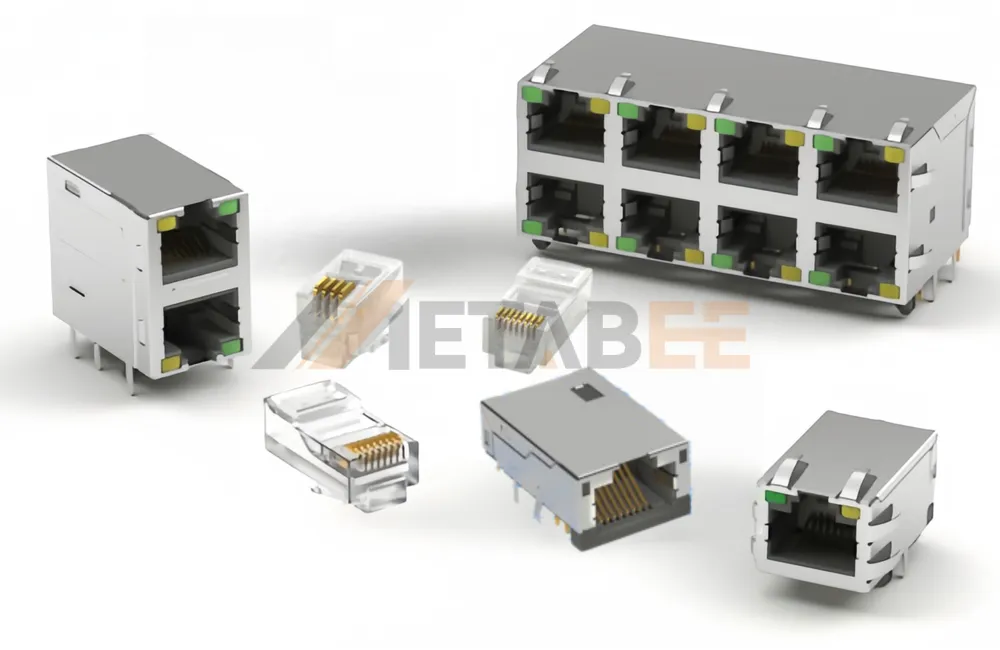
(If you want to learn more about the basic definition, please refer to our detailed guide on What is an RJ45 Connector).
What is a Shielded RJ45 Connector?
A shielded rj45 connector is designed to protect data signals in environments with high electromagnetic interference (EMI). Visually, its most distinguishing feature is the metal shield (usually nickel-plated copper or zinc alloy) wrapped around the exterior.
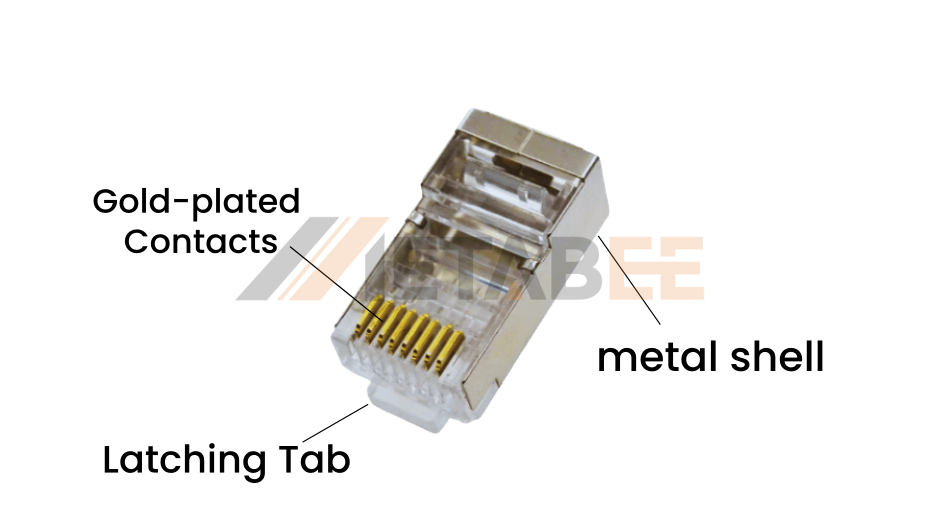
This metal housing doesn't just make it look robust; more importantly, it provides a conductive path. A high-quality shielded rj45 plug will also feature a metal grounding clip at the back to secure the cable's shielding layer.
How Does It Work?
The shielded connector works on the same principle as a Faraday cage. When network cables pass through environments full of electromagnetic interference (EMI), the metal shield on the outside of the connector intercepts these harmful electromagnetic waves.
The key here is Grounding: The metal shell channels intercepted interference through the cable’s drain wire and into the building’s earth ground, ensuring the purity and stability of the internal data transmission.
What is an Unshielded RJ45 Connector?
The unshielded rj45 connector is the most common plug we see in our daily lives. Its structure is very simple: a transparent plastic (polycarbonate) housing that encloses 8 metal contacts (gold pins). It has no metal shielding layer or grounding mechanism.
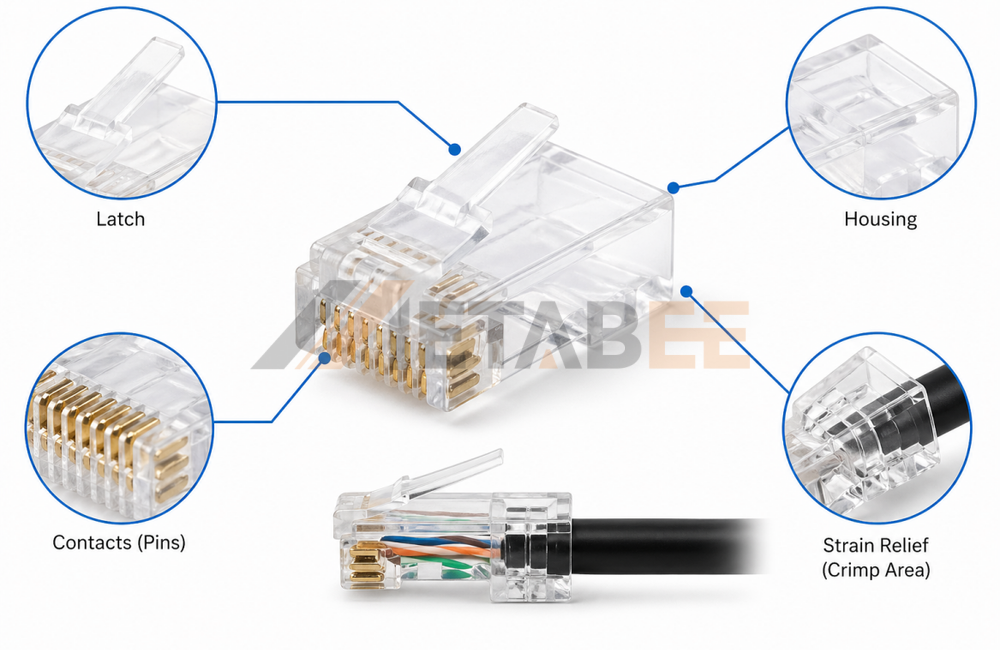
How it works
Because it lacks a physical shield, the rj45 unshielded connector and its corresponding unshielded cable rely entirely on the physical twisting of the internal wire pairs to cancel out electromagnetic interference and crosstalk. For low-intensity interference typical in everyday homes and standard office environments, this physical design is more than enough.
UTP vs FTP vs STP vs S/FTP
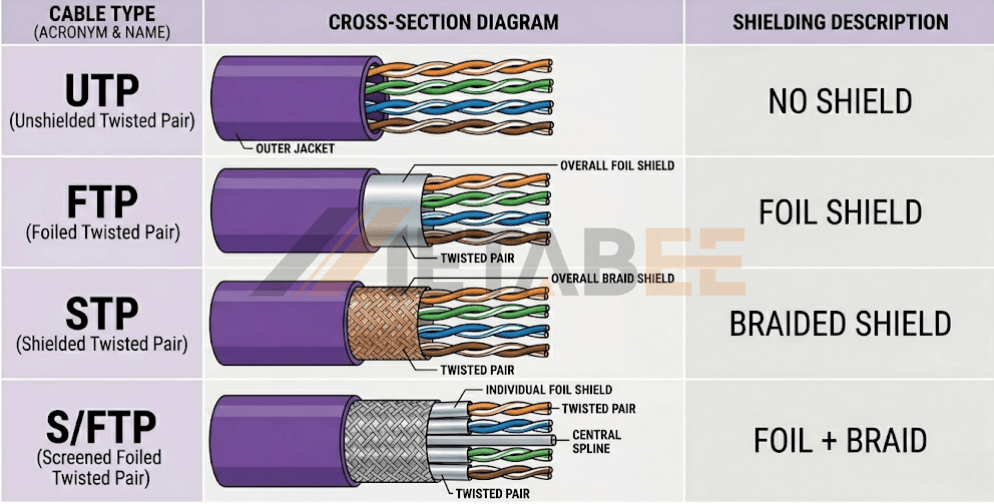
Before choosing between rj45 shielded vs unshielded, you must first understand your network cable type, whether you are using a standard Cat5e cable or a high-performance Cat6 cable. The connector must perfectly match the cable's shielding design. Let's compare the most common cable types to see how their structures and shielding capabilities differ:
- UTP (Unshielded Twisted Pair): UTP consists of color-coded copper pairs twisted together with no shielding layer. It relies solely on wire twisting to naturally combat noise, making it the perfect match for standard unshielded rj45 connector installations.
- FTP (Foiled Twisted Pair): FTP features an overall foil shield wrapped around all four unshielded wire pairs. This overall shield blocks external electromagnetic interference and must be terminated with a shielded rj45 connector to safely drain noise to the ground.
- STP (Shielded Twisted Pair): STP wraps each individual twisted pair in a protective metal foil shield to block internal crosstalk between adjacent pairs. It must be paired with a metal-shelled shielded rj45 connector to maintain grounding.
- S/FTP (Screened Foiled Twisted Pair): S/FTP represents the ultimate dual-layer protective cable design, featuring foil-shielded pairs and an overall metal braided screen. It offers maximum protection against extreme EMI and must be terminated with a heavy-duty shielded rj45 plug.
Quick Comparison Table:
|
Cable Type |
Individual Pair Shielding |
Overall Outer Shielding |
EMI Protection Level |
Recommended RJ45 Plug |
|
UTP |
None |
None |
Low |
Unshielded RJ45 |
|
FTP |
None |
Foil(F) |
Medium |
Shielded RJ45 |
|
STP |
Foil(F) |
None |
High |
Shielded RJ45 |
|
S/FTP |
Foil(F) |
Braided Screen(S) |
Ultimate |
Shielded RJ45 |
(Note: Cables with any form of shielding, such as STP, FTP, and S/FTP, must be paired with a shielded rj45 connector and be properly grounded to function as intended. Using a plastic unshielded plug will break the continuous shielding path.)
Confused about cable classes or looking for bulk orders? Welcome to contact Metabee for a customized project quote and engineering support.
Shielded vs Unshielded RJ45 Connectors---Key Differences
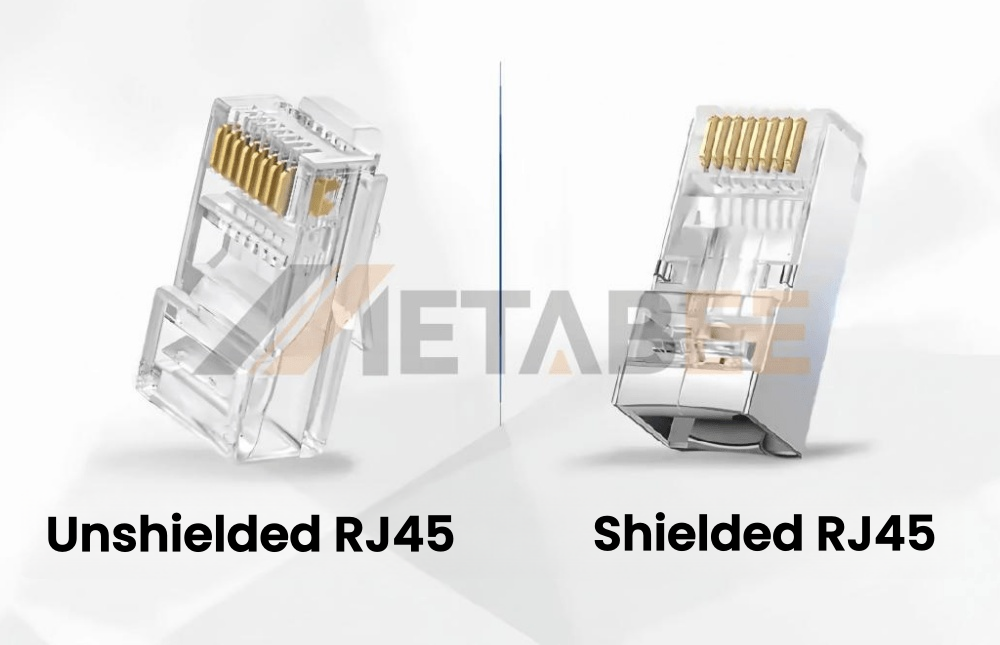
To decide whether you need an unshielded rj45 connector or a shielded rj45 plug, you must understand how they handle interference, how they are installed, and what happens when components are mixed. Let's explore these differences in clear, practical detail.
Handling EMI, RFI & Crosstalk
While both connectors terminate Ethernet cables, they are engineered for very different environments. Choosing between them impacts your network's throughput, noise defense, and project budget. Simply picking the cheapest option can lead to signal drops, static damage, or system downtime in high-density installations. To build a reliable network, we must analyze how they handle interference, physical durability, and grounding. Let's dive into these critical differences to help you make the right choice.
How Unshielded Connectors Manage Noise:
Unshielded connectors don't have physical barriers to block noise. Instead, they rely on a transmission technique called differential signaling along with twisted wire pairs.
When a signal is sent, it travels down a pair of wires as two equal but opposite signals. When external electromagnetic interference (EMI) hits the wire, it affects both wires equally. The receiving device subtracts the two signals from each other, which naturally cancels out the identical noise.
While this works great for everyday home use, it struggles in tight spaces. When hundreds of unshielded connectors are packed closely together (like in data centers), high-frequency signals can bleed into adjacent ports. This is known as Alien Crosstalk (AXT), and without physical shielding, plastic connectors simply cannot block this localized leakage.
How Shielded Connectors Defeat Noise:
A shielded rj45 connector provides a physical barrier that actively blocks interference using two principles:
The Reflective Shield (Bouncing Noise Away): When low-frequency electric fields hit the solid metal shell of the connector, they encounter a boundary mismatch. Because metal conducts electricity much better than air, the metal shell acts as a mirror, bouncing the electromagnetic waves away from the sensitive inner wires.
The Absorption Trap (Draining High-Frequency Noise): High-frequency interference (like Wi-Fi, cell phone signals, or industrial equipment hums) is harder to bounce off. Instead, the metal shell absorbs this energy. As the electromagnetic wave enters the metal casing, it converts it into small eddy currents within the metal shell, which are dissipated as heat.
One critical factor that determines how well this absorption works is the physical integrity of the metal shell itself. High-frequency signals have extremely short wavelengths, meaning even small gaps or seams in a stamped-metal housing can allow EMI to slip through. This is why premium shielded RJ45 plugs use seamless die-cast zinc-alloy housings — the 360-degree continuous metal structure leaves no physical path for high-frequency noise to exploit.
The Role of Grounding: Once those absorbed currents are trapped in the metal shell, they must go somewhere. If they stay, they will eventually leak into your data. A proper grounding path safely drains these currents away from your network signals and into the building's ground.
Grounding & Installation Pitfalls
Installing an RJ45 connector is not a "one-size-fits-all" process. The physical steps, complexity, and tools required to crimp an unshielded rj45 connector compared to a shielded rj45 plug are vastly different.
Unshielded Installation: The Simple One-Piece Crimp
The physical installation of an unshielded connector is incredibly straightforward and quick (usually taking less than a minute per end):
One-Piece Design: Unshielded connectors are typically a single plastic body. You simply strip the outer jacket of the UTP cable, untwist and align the 8 colored wires into the standard T568A or T568B sequence, cut them straight, and slide them directly into the plastic channel of the plug.
Standard Crimping: You insert the plug into a standard RJ45 crimping tool and squeeze. The tool pushes the gold contacts down into the wire cores and compresses the internal plastic wedge to grip the outer jacket for strain relief. That is it.
Shielded Installation: The Precision Multi-Piece Assembly
Installing a shielded connector requires extreme precision, patience, and a specific sequence of manual steps to ensure the metal shielding remains completely intact and grounded (taking 3 to 5 minutes per end):
Handling the Shielding Elements: After stripping the outer jacket of a shielded cable (STP/FTP), you must carefully pull back the metallic foil shield without tearing the thin silver drain wire. The foil is folded backward over the cable jacket, and the drain wire is wrapped tightly around it.
Multi-Piece Loading Bars: Because shielded cables are thicker, most premium shielded plugs use a two-piece design. You must first thread the 8 wires through a tiny plastic load bar (or wire guide) in the correct color sequence, clip them flush, and then slide this loaded assembly into the main metal connector housing.
Dual-Action Crimping: You cannot use a standard plastic crimper. You must use a specialized shielded crimping tool. This tool performs two tasks simultaneously: it presses down the gold pins and crimps the heavy metal tail clamp around the folded foil/drain wire at the back of the plug. This tail-clamp crimping creates a solid metal-to-metal seal that anchors the cable and secures the electrical ground path.
The Continuous Grounding Path:
For a shielded connection to work, you must maintain an unbroken path of metal-to-metal contact from one end of the network to the other:
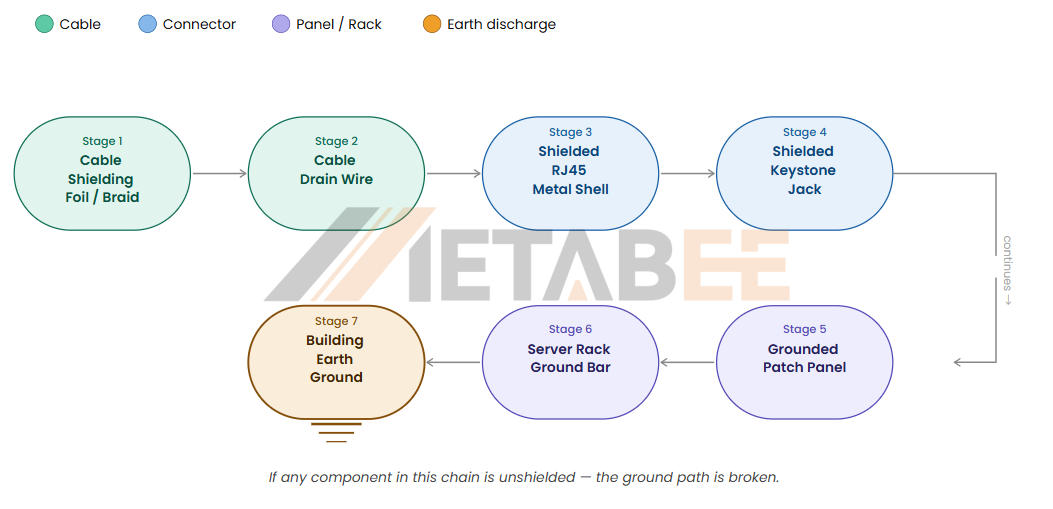
If even one component in this chain is plastic (unshielded), the ground path is broken.
What Happens If a Shielded RJ45 Connector Is Not Grounded?
If you do not ground a shielded RJ45 connector, it will actually attract more electromagnetic interference (EMI) and perform significantly worse than a standard, cheaper plastic unshielded connector. Here are the two primary electrical hazards that occur when a shielded system lacks proper grounding:
The "Floating Ground" (The Antenna Effect): If you install a shielded rj45 plug but fail to connect the cable's drain wire to it, or plug it into a non-grounded plastic network switch, the shield becomes "floating." Instead of protecting the wires, the ungrounded metal shell acts as an antenna, gathering ambient electromagnetic noise from the air and concentrating it directly onto your data lanes. This can lead to worse latency and slower speeds than if you had used unshielded components!
Ground Loops: This occurs when a shielded cable is grounded at both ends to two different electrical systems with different electrical potentials. This difference in electrical potential forces a current to flow through the shielding mesh itself, introducing new electrical noise into the communication lines.
Because of these factors, unshielded systems—which require zero grounding knowledge—are far easier and more forgiving to install for non-professionals.
Comprehensive Comparison Table
| Technical Feature | Unshielded RJ45 Connector | Shielded RJ45 Connector |
| Housing Material | Polycarbonate plastic | Nikel-plated copper or zinc-alloy |
| EMI/RFI Protection | None(Relies on cable wire twists) | Reflects and absorbs environmental EMI/RFI |
| Alien Crosstalk Protection | Moderate(Prone to high-frequency) | Excellent(Complete port-to-port isolation) |
| ESD Device Defense | None (Static bypasses to motherboard port) | High(Integrated shell drains static to ground) |
| Grounding Requirement | None (Non-conductive) | Mandatory (Requires full metal-to-metal continuity) |
| Ground Loop Risk | None | Yes (If incorrectly grounded at endpoints) |
| Physical Durability | Standard (Plastic clips are prone to snapping) | Extreme (Heavy-duty metal resists crushing/wear) |
| Installation Complexity | Simple (Plug-and-play assembly) | Advanced (Requires stripping shield & wrapping drain) |
| Required Crimper | Standard RJ45 crimping tool | Shielded crimping tool or toolless design |
Connector and Cable Compatibility
When building your network, a common question often arises: can you mix and match shielded and unshielded components?
The short answer is that while you can physically plug them into each other, doing so completely fails to provide any real protection. To truly deliver functional shielding benefits, there is one ironclad rule you must follow: shielded connectors must only be used with shielded cables, and unshielded connectors must only be used with unshielded cables.
Mixing these components is highly discouraged and can severely degrade your network performance. Let's break down exactly why you must never cross-connect them:
Why You Cannot Use a Shielded RJ45 Plug on an Unshielded Cable (UTP)
If you crimp a metal shielded rj45 plug onto a standard unshielded (UTP) cable, you are essentially throwing money away.
The Reason: Unshielded cables do not contain any metal foil shielding or a metal drain (ground) wire. Since there is no internal metal structure inside the cable to connect to the metal shell of the plug, the plug's shield remains completely disconnected. It will provide absolutely zero shielding benefit.
Why You Cannot Use an Unshielded RJ45 Connector on a Shielded Cable (STP/FTP)
Using a plastic unshielded rj45 connector on a shielded cable is a critical installation mistake that will actively harm your network signal.
The Reason: A shielded cable is designed to act like a pipe that captures ambient electrical noise (EMI) and carries it along the outer shield. This captured noise must be drained out of the system through a metal connector connected to a grounded device.
The Consequence: If you use a plastic unshielded plug at the end of a shielded cable, you cut off the escape route for that electrical noise. Because the plastic plug cannot ground the cable, the captured noise becomes trapped inside the cable shield. The shield then acts like a giant antenna, radiating the trapped interference directly into your inner data wires. This leads to heavy packet loss, massive latency, and worse performance than a cheap unshielded setup.
How to choose between Shielded and Unshielded RJ45 Connectors?
Making the final decision between a shielded rj45 connector and an unshielded rj45 connector comes down to evaluating three main factors: your physical environment, the routing paths of your cables, and the devices you are connecting. Let's break down the exact real-world scenarios where each type excels so you can confidently make the right call for your network deployment.
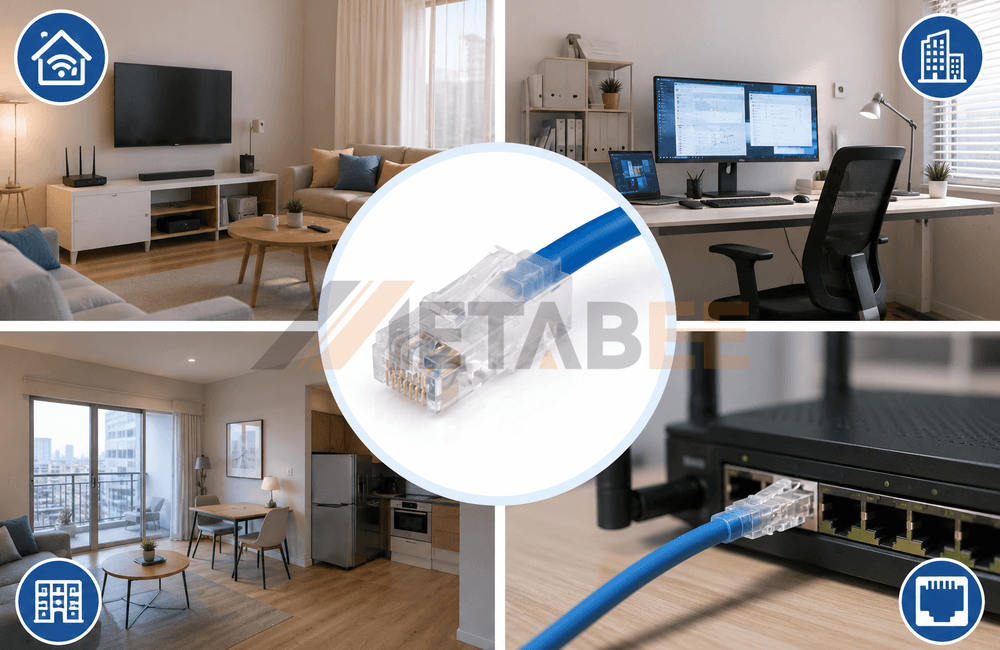
When to choose an Unshielded RJ45 Connector?
If you are wiring your home, apartment, or standard commercial office, and the cables do not need to pass through high-interference sources like elevator shafts or electrical distribution panels, then the unshielded rj45 connector is your best choice. It is cost-effective, easy to install, and an unshielded Cat6 system is more than enough to support extremely high home network bandwidths.
When MUST you choose a Shielded RJ45 Connector?
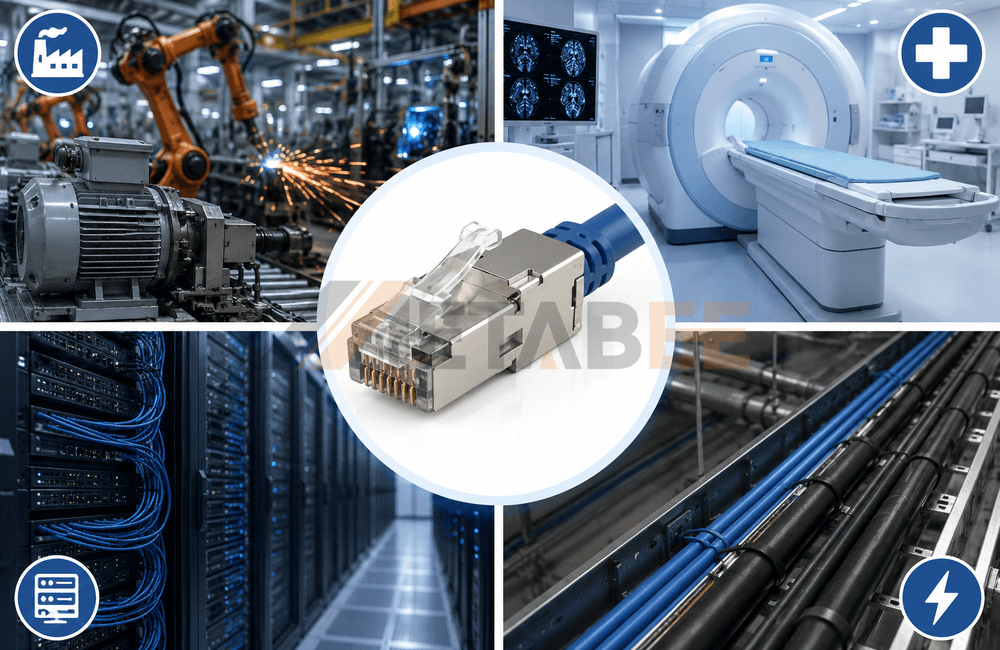
If your network is deployed in the following scenarios, do not hesitate to choose a shielded system:
- Industrial Environments: Factory floors with large generators, heavy machinery, or welding equipment.
- Medical Facilities: Near MRI machines or other equipment that generates strong electromagnetic radiation.
- High-Density Data Centers: Hundreds of cables bundled together, requiring prevention of severe alien crosstalk.
- Special Routing Paths: When network cables must run parallel to AC power lines inside the same conduit for long distances.
How to Evaluate Your Environment and Choose the Right Connector: Evaluate your installation environment. If there are obvious sources of electromagnetic interference, choose shielded cables first (like Cat6a S/FTP), and then purchase the corresponding shielded rj45 connector.
Conclusion
Ultimately, choosing between shielded and unshielded RJ45 connectors comes down to your specific environment and cable compatibility. While unshielded connectors are the optimal, cost-effective, and easy-to-install choice for 90% of home and standard office networks, shielded connectors remain essential for industrial, medical, and high-density environments subject to severe electromagnetic interference. To ensure a fast and reliable connection, always match your connector to your cable type—using shielded for STP/FTP and unshielded for UTP—and guarantee complete end-to-end grounding for all shielded components to prevent noise accumulation.
Need help navigating the complexities of network cabling and connector types? Reach out to Metabee's technical experts for personalized guidance and a competitive quote. We are here to help you design a rock-solid, high-performance network system that fits your budget perfectly! Welcome to contact Metabee for a customized project quote
Related Products:RJ45 Connectors
Cat5E Cables
Cat6 Cables
Cat6A Cables
FAQ
Q1: Can I use a shielded RJ45 connector with a standard UTP (unshielded) cable?
A: Technically yes, but it is a complete waste of money and provides zero shielding benefits. To make a shielded connector function, there must be an internal metal shield or a copper drain wire inside the cable to connect to the metal shell of the plug. Because a UTP cable lacks these metallic elements, the metal housing on the shielded RJ45 connector will have nothing to connect to, leaving the plug's shield completely disconnected and unable to protect your signals.
Q2: Why is my network slower after upgrading to a shielded RJ45 plug?
A: This is usually caused by a "floating ground" due to incorrect grounding. If you crimp a shielded RJ45 plug but do not connect the cable's drain wire, or plug it into a non-grounded plastic network switch, the shield becomes floating. Instead of blocking noise, the ungrounded metal shell acts as an antenna, gathering ambient electromagnetic interference from the air and radiating it directly onto your data lanes.
Q3: What happens if I use an unshielded plastic plug on an STP (shielded) cable?
A: This breaks the continuous grounding path and traps noise inside the cable. A shielded cable captures ambient electrical noise along its outer shield. If you terminate it with a plastic unshielded RJ45 plug, you cut off the escape route for that noise. The captured interference becomes trapped and radiates directly into your data wires, leading to heavy packet loss and massive latency.
Q4: Do I need a special crimping tool for shielded RJ45 connectors?
A: Yes, a specialized shielded crimper is required to secure the metal tail clamp. Unlike unshielded connectors that only need their contacts pressed down, shielded plugs have a heavy metal tail clamp at the back. You must use a tool with a specialized rear die to bend and secure this metal clamp around the cable's drain wire, ensuring a solid metal-to-metal grounding seal.
Q5: What is a "ground loop" and how can I avoid it?
A: A ground loop occurs when a shielded cable is grounded at both ends to systems with different electrical potentials. This potential difference forces an unwanted current to flow through the shielding mesh itself, introducing new electrical noise. To avoid this, ensure your entire network infrastructure shares a unified, professionally grounded electrical system, or ground the shield only at the central distribution point.
Q6: Why do shielded RJ45 connectors require "load bars"?
A: Load bars are tiny plastic wire guides used to manage thicker, stiffer shielded conductors. Because STP and S/FTP cables (like Cat6a or Cat7) have thick wires and internal foil dividers, they cannot easily slide directly into a standard one-piece plug. The load bar allows you to pre-align the 8 wires in the correct sequence and clip them flush before sliding the assembly into the metal housing.
Q7: Are shielded RJ45 connectors necessary for high-definition streaming and gaming at home?
A: No, standard unshielded connectors are more than sufficient for normal residential environments. Standard homes do not have high-voltage generators or industrial machinery. A quality unshielded Cat6 setup supports up to 10Gbps over short distances, and its physical twisted pairs easily cancel out the mild, everyday electromagnetic noise without the need for complex metal shielding.
Q8: What is "Port-to-Port Crosstalk" and how do shielded plugs prevent it?
A: Port-to-Port Crosstalk is the high-frequency signal leakage between closely packed ports. When hundreds of unshielded connectors are bundled tightly together in a patch panel or server switch, high-frequency signals can bleed into adjacent channels. A shielded RJ45 plug wraps each port in solid metal, acting as a physical wall that guarantees complete port-to-port electrical isolation.
Q9: Can static electricity damage network equipment, and does shielding help?
A: Yes, static electricity can built up on cables and fry motherboard ports, but shielding drains it safely. In dry environments, cables accumulate static. A shielded RJ45 connector acts as a lightning rod, intercepting the static charge and safely draining it through the grounded metal chassis of the switch into the earth, preventing unexpected Electrostatic Discharge (ESD) from damaging devices.
Q10: How do I choose between zinc-alloy and nickel-plated copper shielded plugs?
A: Zinc-alloy housings offer maximum physical durability, while nickel-plated copper is more cost-effective. Premium 360-degree zinc-alloy die-cast plugs are virtually indestructible, resist crushing, and offer perfect seamless shielding against high-frequency leaks. Nickel-plated copper plugs are slightly thinner and lighter, making them excellent and economical for tight patch panels.
