
登录
¥CNY
购物车

1. Add the item to your cart.
2. Enter the cart and checkout securely. If you have a Metabee account, you can log in to continue; if not, you can check out directly.
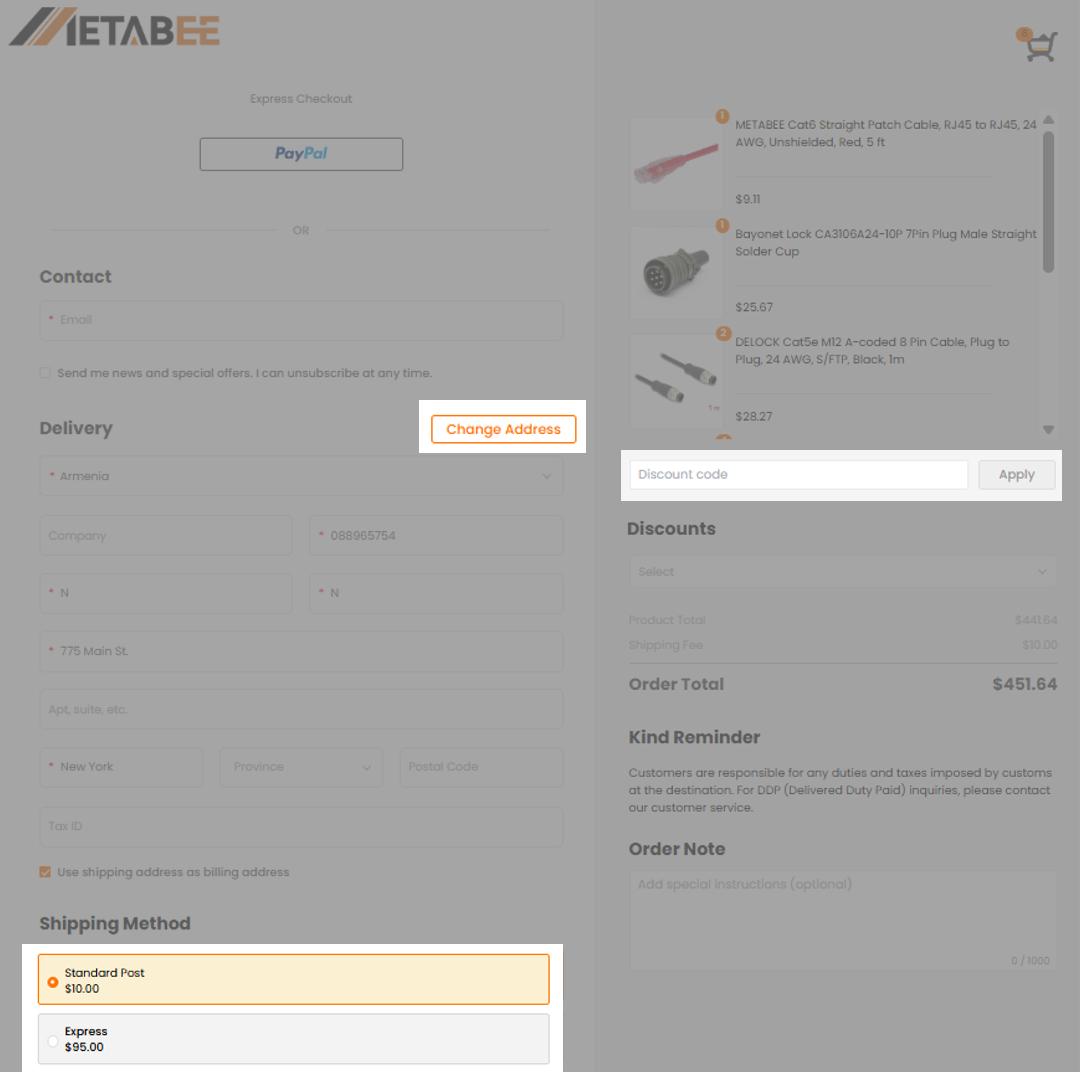
3. Add your shipping and billing addresses.
4. Select the shipping method.
5. Select the coupon and complete the payment.
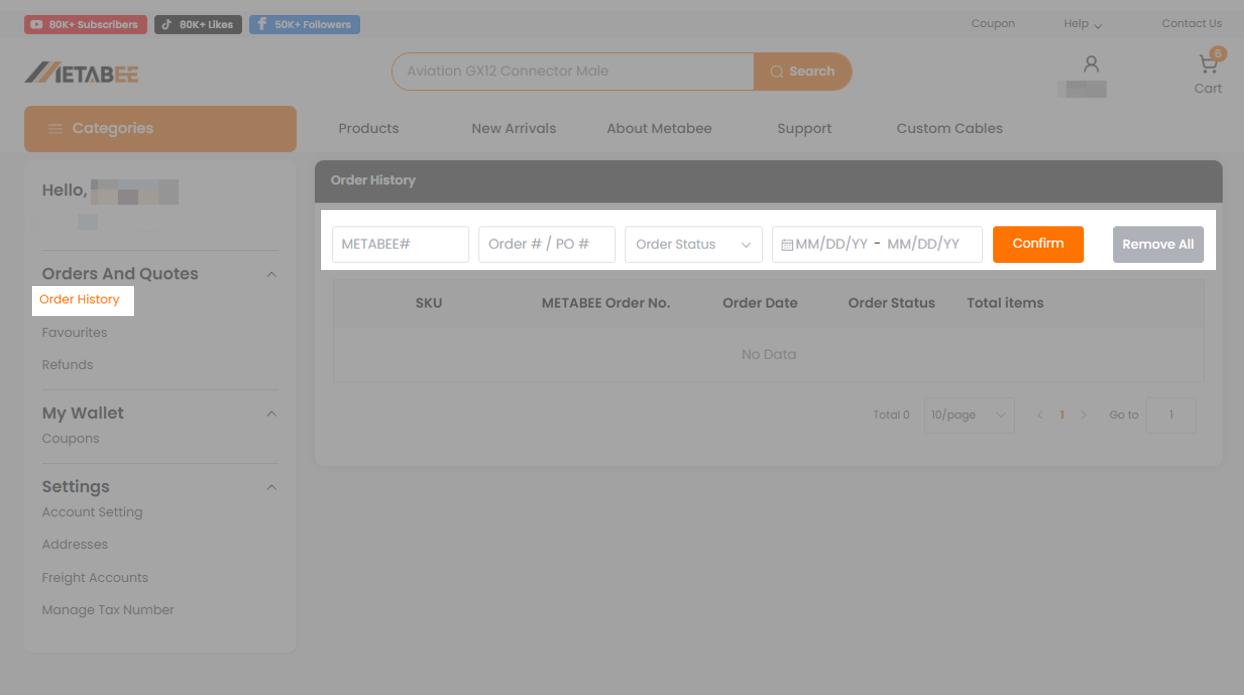
If the order is not paid, the customer can cancel the order. Find the order in "Order History," and you can find the option to "Cancel Order."
For paid orders, please get in touch with customer service.
Notice
Inventory orders cannot be cancelled after they are shipped, and if the customer cancels after the order has been processed at the Metabee warehouse, a restocking fee of $0.50 per item will be charged.
After payment or confirmation of any contracts and agreements, customers cannot cancel extended orders. Metabee's customer service staff will contact you if cancellations are necessary due to insufficient supply.
Registered users, please log in on the homepage and click "Order History" to view your order details/status.
You can buy without registering an account.
However, having a Metabee account allows you to enjoy more convenient, fast and valuable services, such as the following.
1. Submit your return order online
2. Automatically fill in your default shipping and billing address information at checkout
3. Shopping cart records and order history can be automatically saved
4. You can add products to the "Favourites" list
Click to register and join us!
Metabee provides electronic components at competitive prices in the Chinese market and offers multiple price ranges. Therefore, usually, we sell items at the market price.
But if the quantity you need is larger than the highest ladder, you are welcome to contact us to see if we can offer a better price.
The estimated weight of each product is displayed below the SKU information in the Shopping Cart.
The total estimated weight shown in the Summary section is automatically calculated based on the preset weight, selected quantity, and selection status of each product.
The total estimated weight will update automatically when you:
Please note that the displayed weight is provided for shipping cost estimation only. The preset product weight includes an allowance for standard packaging, but it may not exactly match the actual weight.
If you believe that the displayed weight is inaccurate, please contact us at help@metabee.com before placing your order. Please provide the product SKU, quantity, and a screenshot of the displayed weight so our team can verify it.
Customs duties, VAT, import taxes, and customs clearance requirements depend on the shipping method and destination country or region. Some shipping services include prepaid taxes and customs clearance, while others only include customs clearance service or require the buyer to handle clearance independently.
Express Shipping
For Express shipments to the United States, applicable taxes are collected in advance, and customs clearance will be handled by the shipping service. Buyers usually do not need to clear customs or pay customs duties or VAT again upon delivery.
For Express shipments to other countries or regions, taxes and customs clearance are not included. Buyers are responsible for customs clearance and any customs duties, VAT, or import-related fees charged by the destination country or region.
Standard Shipping
For Standard shipments to the United States, taxes are not collected in advance, but customs clearance will be handled by the shipping service. Buyers usually do not need to clear customs by themselves. However, any customs duties, taxes, or import-related fees charged by the destination country or carrier are the buyer's responsibility.
For Standard shipments to European Union countries, applicable taxes are collected in advance, and customs clearance will be handled by the shipping service. Buyers usually do not need to clear customs or pay customs duties or VAT again upon delivery.
For Standard shipments to other non-EU countries or regions, taxes and customs clearance are not included. Buyers are responsible for customs clearance and any customs duties, VAT, or import-related fees charged by the destination country or region.
Special Notice for Turkey
Turkey has relatively high customs clearance fees and import-related charges. Buyers shipping to Turkey should pay special attention to local customs policies, as customs clearance fees, duties, VAT, or other charges must be paid by the buyer if incurred.
Tax rules and customs policies vary by country or region. We recommend checking your local customs and import tax policy before placing an order.
For more details, please see our FAQ: Customs, Duties, and Taxes.
Yes. Just submit a ticket or feel free to send an email to [email protected] if you want to make any change to your order including cancel or add items, change the delivery method etc. We will do it for you.
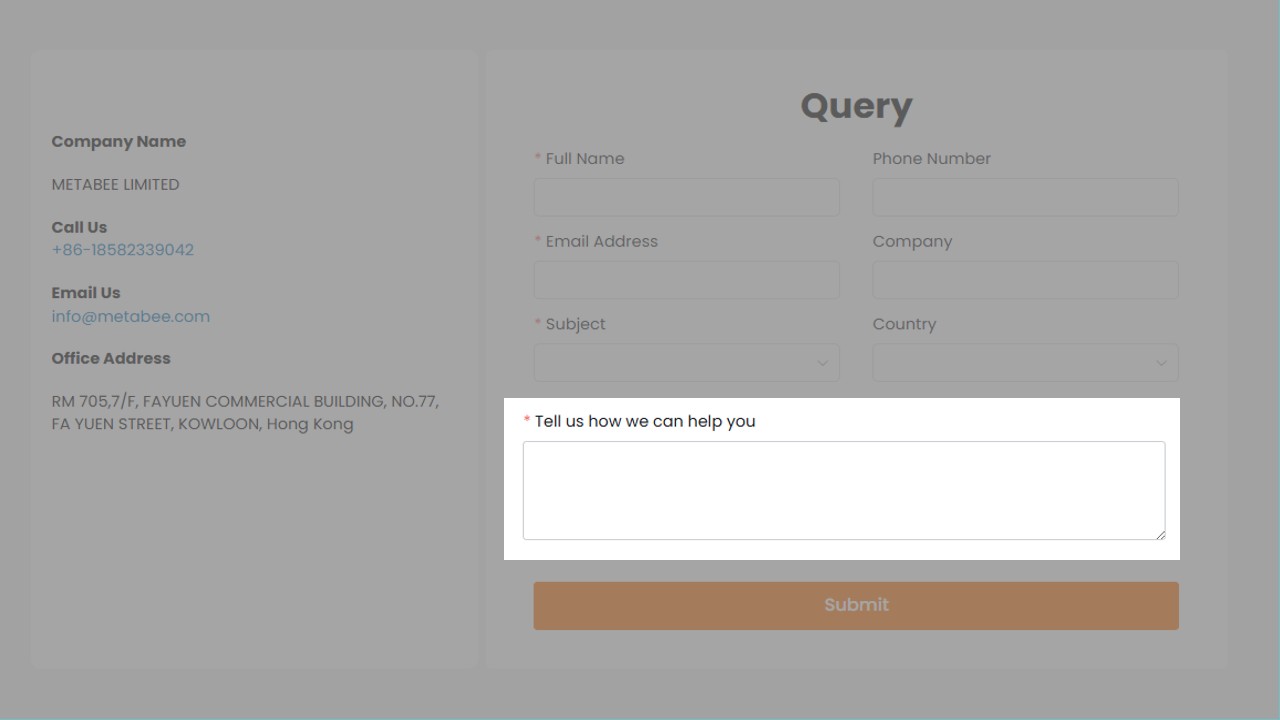
If you have any other question, please feel free to contact our customer service.
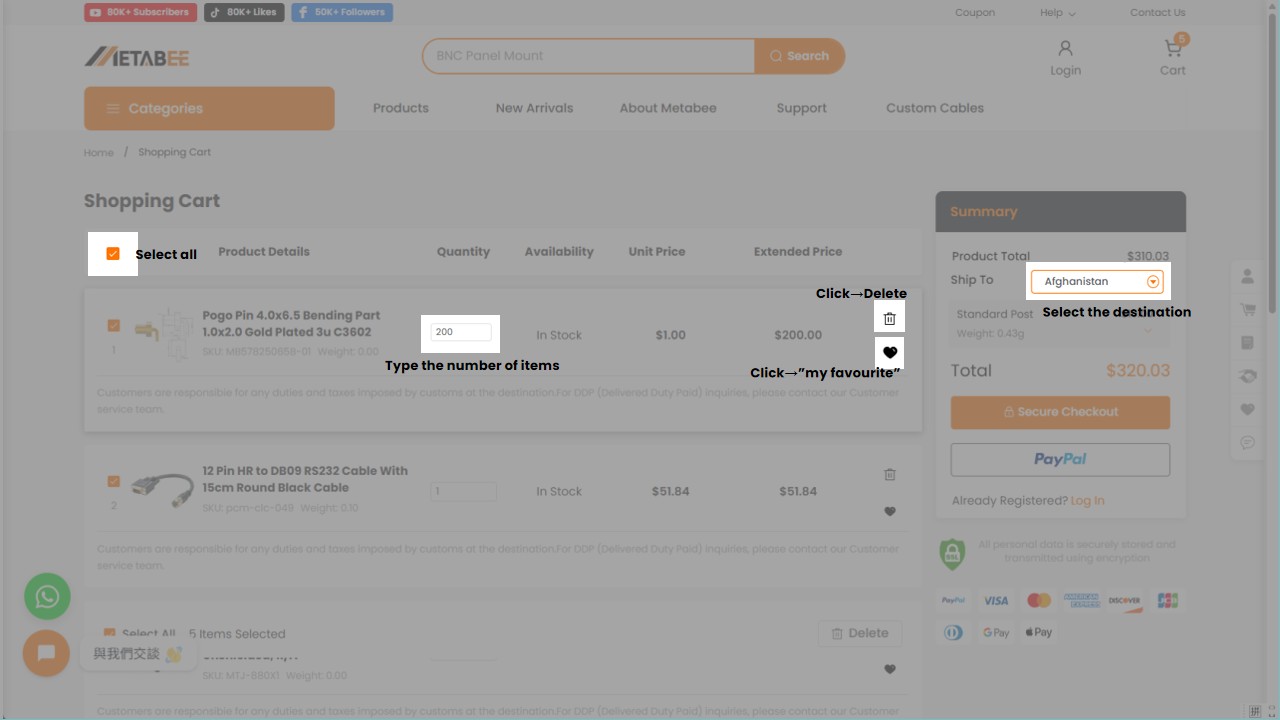
Welcome to our independent website shopping cart system! To help you get started quickly, here’s an overview of the core functions and usage instructions. Combined with the accompanying diagram, you’ll easily grasp the operation logic for a smoother shopping experience:
Adjust Product Information
You can directly modify the quantity of products in the cart (e.g., increase, decrease, or remove items) or change product specifications (e.g., size, length, etc.). After making adjustments, the system will automatically update the total price of the products.
View Product Details
If you need to verify product information (such as material, specifications, user reviews, etc.), simply click on the product name or image to quickly jump to the product details page for review.
Save Favorite Products
For items you don’t wish to purchase immediately, use the "Favorite" function to save them to your account. This avoids repeated searches and does not affect other items in your cart.
Apply Promo Codes
Enter a promo code (e.g., discount code, threshold discount code) in the designated area and click "Apply" to enjoy the corresponding discount. The system will instantly display the discounted amount and discount details.
Select Delivery Region and Method
Use the delivery region dropdown menu to choose your receiving province/city/area. The system will automatically match available delivery methods (e.g., standard delivery, expedited delivery, etc.) based on your selection, along with corresponding shipping fees and estimated delivery times. Please ensure the region is selected accurately to avoid delays in delivery.
Submit Order
After confirming the products, amount, and discount information are correct, click the core checkout button to proceed to the next step. Fill in the detailed delivery address, select a payment method (e.g., credit card), and complete the order submission.
Continue Shopping
If you need to add other products, click the corresponding button to return to the product listing page. Items already in your cart will be automatically retained, so you won’t need to reselect them.
Get Help
If you encounter operational issues (e.g., failed product modifications, invalid promo codes, etc.), contact customer service or view the FAQ section for quick solutions.
Friendly Reminders
Products in your cart will be reserved for a certain period (please refer to the on-page prompt for details). We recommend checking out promptly to avoid items being sold out.
All operations are synchronized in real time. You can view the total product price, discount amount, and delivery information at any time, ensuring transparent and controllable shopping.
If you have any other questions, feel free to contact our customer service team. Happy shopping!
To help us process your order smoothly and avoid delivery delays, please make sure your delivery address is complete, accurate and easy for the carrier to understand.
How to fill in your delivery address
When adding or editing a delivery address, please select your Country/Region first. Some address fields, such as State, ZIP Code or Tax Number, may vary depending on the destination country or region.
Please check the following information carefully:
Use shipping address as billing address
If your billing address is the same as your shipping address, you can keep Use shipping address as billing address selected.
If your billing address is different from your delivery address, please uncheck this option and enter the correct billing information separately.
Tips for entering your address correctly
Use English letters and numbers when possible for international shipping.
If a tax number or VAT ID is required for your destination, enter the correct information to avoid customs or delivery delays.
What should I avoid?
Why is my address not accepted?
If your address cannot be saved or selected at checkout, please check whether all required fields are complete. Required fields are usually marked with a red asterisk.
Please also make sure the country, state or province, city and ZIP code match each other. For some destinations, a tax number, VAT ID or local tax identification number may also be required before the address can be saved.
If you are not sure how to fill in your address, please contact Metabee customer service before placing the order. Our team can help you check the address format and reduce the risk of delivery failure.
Don't hesitate to get in touch with [email protected] with the following information.