
In the fast-paced world of industrial automation, factory floors, and medical diagnostics, the reliability of human-machine interfaces (HMIs) and Industrial PCs (IPCs) is paramount. Operators rely on continuous, clear, and uninterrupted visual data to monitor processes, ensure quality control, and maintain safety. However, a display monitor is only as reliable as the connector and wire harness delivering its signal, making the D-Sub vs DVI evaluation a critical first step for any system design.
When designing or upgrading industrial display systems, hardware engineers and procurement managers often face a critical decision regarding video interfaces: should they specify a D-Sub or DVI for their next build? Should you maintain legacy compatibility with traditional D-Subminiature (D-Sub) connectors, or should you upgrade your systems to the Digital Visual Interface (DVI)?
Understanding the difference between D-Sub and DVI is essential. Making the wrong choice can lead to signal degradation, system downtime, or unnecessary infrastructure costs. This comprehensive guide provides a technical deep dive into D-Sub and DVI connectors. We compare their signal processing, mechanical durability, and resolution capabilities. This analysis will help you choose the exact display interface for your specific applications.
The Basics: Defining D-Sub and DVI Connectors
Before diving into the technical comparison, we must establish exactly what these two connector families are. We also need to understand how they operate within a display wire harness.
The D-Subminiature (D-Sub) Connector
Engineers originally introduced the D-Sub connector in the 1950s. It derives its name from its distinctive D-shaped metal shield. This shield provides mechanical support, ensures correct orientation during mating, and offers basic electromagnetic interference (EMI) screening.
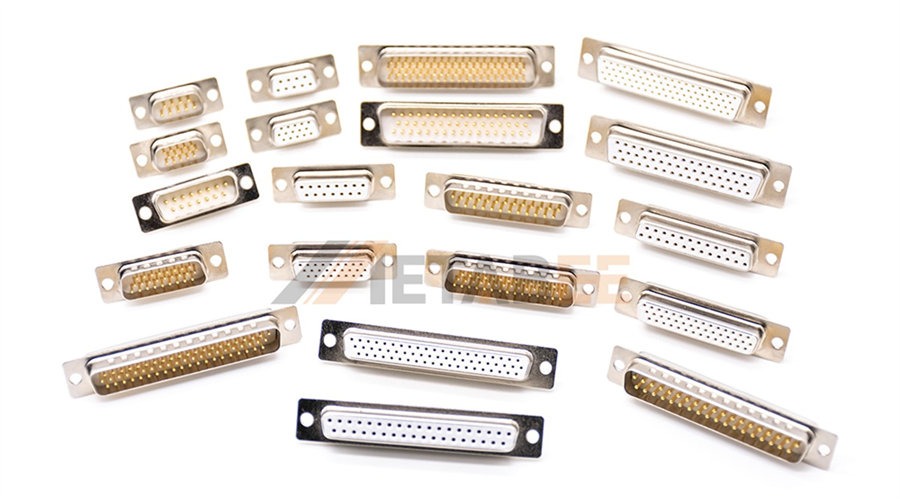
In the context of display interfaces, industry professionals often mention a "D-Sub video connector." They usually mean the DE-15 or HD15 connector. Many people commonly, though sometimes inaccurately, call this the VGA connector. This high-density 15-pin D-sub connector was the undisputed standard for computer video output for decades. It is fundamentally an analog interface. It transmits video signals via varying voltage levels representing red, green, and blue (RGB) color channels, alongside horizontal and vertical synchronization pulses.
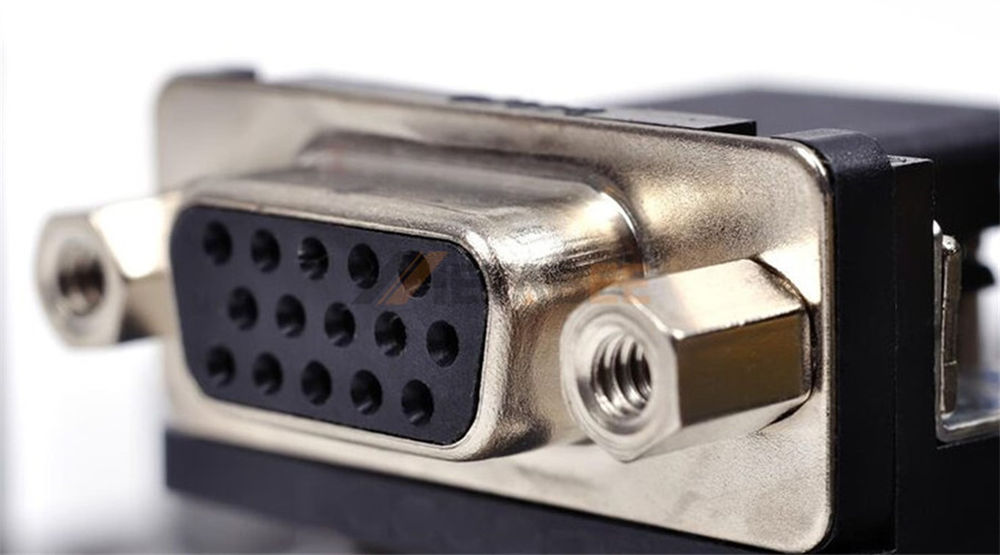
Metabee DE15/HD15/VGA Connectors
The Digital Visual Interface (DVI)
The Digital Display Working Group (DDWG) developed DVI in the late 1990s. They designed this industry standard to transmit uncompressed digital video data to display devices. The goal was to eliminate the analog conversion process required by VGA, maximizing the visual quality of LCD and modern flat-panel displays.
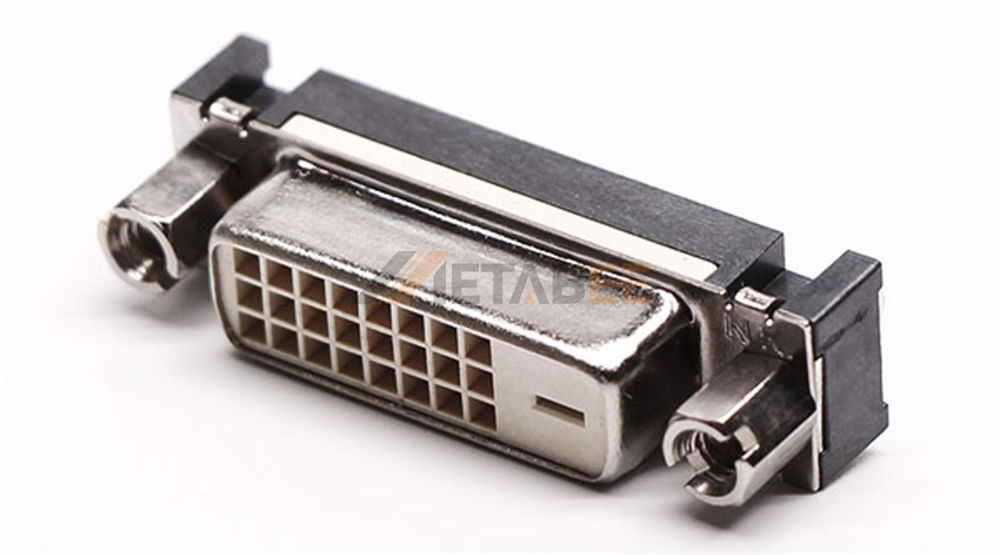
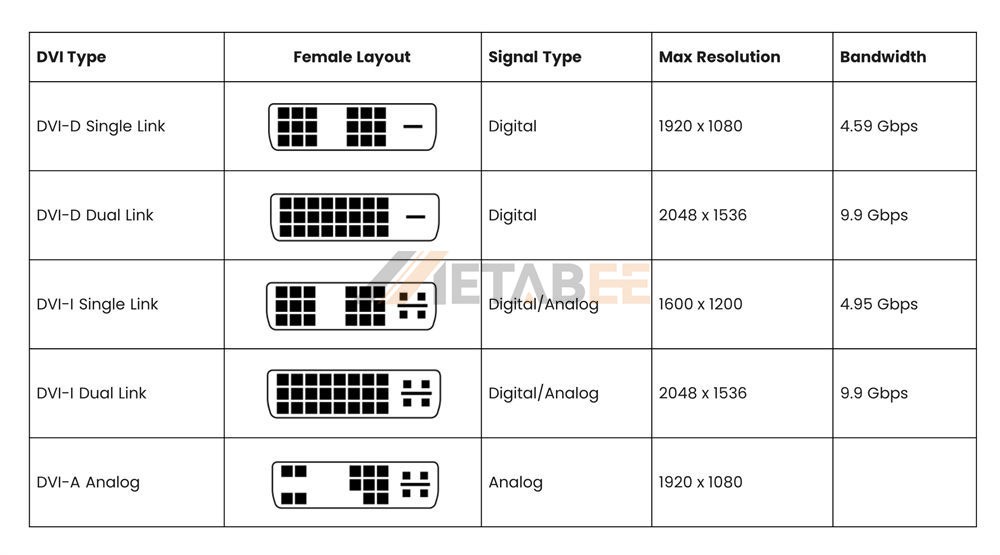
Unlike the single-purpose VGA connector, the DVI standard is highly versatile and comes in three primary variations:
- DVI-A (Analog): Transmits only analog signals. Engineers use it primarily for backward compatibility with older monitors. It is essentially a VGA signal in a DVI housing.
- DVI-D (Digital): Transmits only digital signals. When evaluating D-Sub vs DVI-D, this format represents the true digital upgrade, providing pixel-perfect clarity. The core D-Sub DVI-D difference is the complete elimination of digital-to-analog conversion logic.
- DVI-I (Integrated): Transmits both digital and analog signals. This highly flexible connector allows a single port to drive either a digital monitor or an older analog VGA monitor (using a simple passive adapter).
Looking for reliable DVI cables? Metabee provides industrial-grade DVI cable assemblies tailored to your exact specifications.
Core Technical Comparison: D-Sub vs. DVI
Understanding the core difference between D-sub and DVI connectors in how these connectors process data and withstand industrial environments is key to making an informed procurement and design decision.
Signal Processing and Quality
When evaluating D-Sub vs DVI quality, the most significant factor lies in how they handle the video signal from the source to the screen.
With a D-Sub (VGA) connection, the graphics processing unit (GPU) generates a digital image. A Digital-to-Analog Converter (DAC) must then convert this image into an analog signal. This analog signal travels down the wire harness to the monitor. There, an Analog-to-Digital Converter (ADC) translates it back into a digital image for the LCD panel. Every conversion introduces the potential for signal loss. Furthermore, analog signals are highly susceptible to electromagnetic interference (EMI) and radio frequency interference (RFI). This interference is rampant in industrial environments filled with heavy motors, variable frequency drives (VFDs), and power generators. It manifests as ghosting, blurring, or screen flickering.
DVI (specifically DVI-D and the digital pins of DVI-I) bypasses this entirely. The signal remains digital from the GPU to the monitor panel. This direct digital mapping ensures that the connector maps each computer-rendered pixel exactly to the corresponding pixel on the screen. The result is a sharper, clearer image. It offers absolute color accuracy and a significantly higher resistance to the EMI/RFI issues that plague analog cables.
Mechanical Durability and Pin Configurations
In industrial electronics, physical robustness is just as important as electrical performance. Both D-Sub and DVI connectors excel in high-vibration environments due to their use of jackscrews (thumbscrews). These locking mechanisms ensure the connector remains firmly mated to the receptacle, preventing accidental disconnects caused by machinery vibration or cable strain.
- D-Sub Durability: The D-Sub is exceptionally rugged. Its stamped and formed metal shell provides excellent protection. The D-shaped housing protects the pins well. For extreme environments, Metabee provides specialized D-Sub connectors. These feature machined contacts for higher mating cycles and IP67-rated housings for dust and waterproof sealing.
- DVI Durability: The DVI connector is physically larger and bulkier than the 15-pin D-Sub. It features a larger pin grid array and a prominent flat grounding blade (in DVI-I and DVI-A). While robust, users can bend the DVI pins more easily during careless insertion compared to the tight DE-15 cluster. However, industrial-grade overmolded DVI cables provide excellent strain relief and durability.
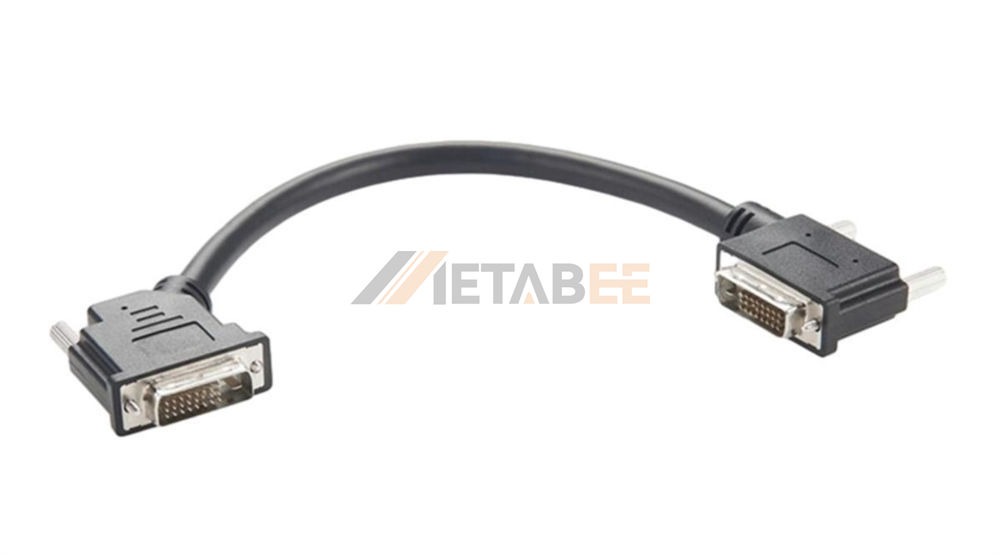
Metabee Industrial-Grade Overmolded DVI Cable
Resolution, Bandwidth, and Cable Length
The transmission capabilities of your wire harness will dictate the maximum resolution and the distance you can run your displays.
D-Sub (VGA) Limitations
VGA can support resolutions up to 1920x1080 (1080p) or even 2048x1536 under ideal conditions. However, VGA signal quality degrades rapidly over distance. High resolutions require thick, heavily shielded coaxial cables within the wire harness. Over lengths exceeding 15 meters (50 feet), analog attenuation causes noticeable image softening. You must deploy active signal boosters to prevent this.
DVI Capabilities
The Transition Minimized Differential Signaling (TMDS) protocol governs DVI transmission.
- Single-Link DVI uses one TMDS transmitter and supports resolutions up to 1920x1200 at 60Hz.
- Dual-Link DVI doubles the bandwidth, supporting massive resolutions up to 2560x1600 at 60Hz, ideal for large control room displays.
Cable Length: Digital signals suffer from a "cliff effect." Up to roughly 5 meters (15 feet), the signal is perfect. Beyond this distance, the digital signal can drop off entirely. This results in a blank screen rather than a degraded image. To avoid this, you need a high-quality active cable with built-in equalization chips.
Quick Reference: D-Sub vs. DVI Comparison Matrix
To simplify your engineering and procurement decisions, here is a quick-reference matrix comparing the standard 15-pin D-Sub (VGA) to digital DVI formats.
|
Feature / Specification |
15-Pin D-Sub (VGA) |
DVI-D (Digital Only) |
DVI-I (Integrated) |
|
Signal Type |
Analog |
purely Digital |
Digital & Analog |
|
Signal Quality |
Prone to degradation and ghosting |
Pixel-perfect clarity |
Pixel-perfect (Digital) or standard (Analog) |
|
EMI/RFI Susceptibility |
High (Requires heavy shielding) |
Low (Digital signaling is resilient) |
Depends on the signal being used |
|
Max Resolution |
~1920x1080 (Degrades with length) |
1920x1200 (Single-Link) / 2560x1600 (Dual-Link) |
Same as DVI-D + standard VGA resolution |
|
Locking Mechanism |
Jackscrews (Standard) |
Jackscrews (Standard) |
Jackscrews (Standard) |
|
Best Cable Run (Passive) |
Up to 15m (with signal softening) |
Up to 5m (strict limit without active boosting) |
Up to 5m (Digital) / 15m (Analog) |
|
Primary Industrial Use |
Legacy PLCs, older CNC interfaces, basic HMIs |
Machine vision, medical imaging, modern IPCs |
Mixed legacy/modern environments |
Selection Guide for Industrial Applications
Choosing between D-Sub and DVI is rarely a one-size-fits-all scenario. It depends entirely on your system architecture, budget, and environmental demands.
When to Specify D-Sub Connectors
Despite the digital revolution, D-Sub (VGA) connectors remain highly relevant in B2B supply chains. You should specify D-Sub connections when:
- Maintaining Legacy Equipment: You might manufacture replacement wire harnesses for existing machinery, CNC controllers, or older Programmable Logic Controllers (PLCs). Maintaining the native D-Sub connection avoids the need for complex internal adapter circuitry.
- Cost-Sensitive Rollouts: Analog D-Sub cables and connectors are incredibly cost-effective to manufacture. If your application involves basic, low-resolution HMI touch panels where pixel-perfect clarity is not safety-critical, D-Sub is a highly economical choice.
- Longer Passive Cable Runs: You might need to run a display cable 10 to 15 meters across a factory floor. Active digital signal repeaters add cost and potential failure points. In these cases, heavily shielded analog D-Sub cables remain a viable option. Do you need custom D-Sub cable lengths? Reach out to Metabee for a rapid prototyping quote today.
When to Upgrade to DVI Connectors
Upgrading to a digital interface like DVI is becoming the standard for modern industrial design. You should transition to DVI when:
- Clarity is Mission-Critical: In applications such as high-resolution medical diagnostic imaging, automated machine vision inspection systems, and detailed CAD/CAM control stations, the pixel-perfect clarity of a digital signal is non-negotiable.
- High EMI Environments: Your wire routing might pass near high-voltage lines, induction heaters, or large motors. In these areas, the analog signals of a D-Sub will suffer. The digital TMDS protocol of DVI strongly resists this interference, ensuring a stable display.
- Future-Proofing New Designs: When designing a new Industrial PC (IPC) architecture, specifying DVI (or newer digital standards like DisplayPort/HDMI) ensures compatibility with modern, high-resolution commercial and industrial flat panels.
Bridging the Gap: Interconnectivity Options
In many industrial settings, a complete "rip-and-replace" upgrade is not financially feasible. Facilities often operate mixed environments, pairing new modern IPCs with older analog displays, or vice versa. Fortunately, bridging the gap between D-Sub and DVI is highly achievable.
- Passive Adapters (DVI-I to VGA): If a modern IPC features a DVI-I output port, it is outputting both digital and analog signals. A simple, low-cost passive adapter can map the analog pins of the DVI-I port to a high-density 15-pin D-Sub cable. This allows you to connect a legacy VGA monitor effortlessly.
- Active Converters (DVI-D to VGA / VGA to DVI-D): You might connect a purely digital source (DVI-D) to an analog display (VGA). Or, you might connect an analog source to a digital-only display. In these scenarios, a passive adapter fails. You must use an active converter. These devices incorporate integrated circuits (DACs or ADCs) within the cable housing to translate the signal type actively. While slightly more expensive, they provide crucial flexibility for phased equipment upgrades.
Conclusion
The ongoing debate of the D-Sub connector vs DVI is fundamentally a choice between maintaining reliable legacy compatibility and embracing superior digital performance. When summarizing D-Sub vs DVI, the D-Subminiature (VGA) connector remains a rugged, cost-effective workhorse for older systems and basic displays. However, as industrial applications increasingly demand high-definition visual data, precision machine vision, and resistance to electrical noise, the DVI connector provides the robust digital clarity required for the future of automation.
Understanding the specific technical requirements of your project—from resolution needs to EMI challenges and cable routing lengths—will dictate which connector format is the optimal choice for your bill of materials (BOM).
Need Expert Guidance on Your Next Project? Navigating display interfaces, industrial connector specifications, and custom cable assemblies often presents complex challenges. Contact the Metabee engineering team today to discuss your specific application. Do you need ruggedized IP67 D-Sub wire harnesses, custom overmolded DVI cables, or active conversion solutions? Metabee provides high-quality B2B interconnect solutions tailored exactly to your operational demands. Request a quote or ask for engineering samples now. Let us ensure your display systems perform flawlessly in the field.
Related Products:
Frequently Asked Questions (FAQs)
Q1: What is the primary difference between D-Sub and DVI connectors?
A: The fundamental difference lies in how they transmit data. The standard D-Sub (VGA) is an analog interface, meaning the signal is converted and is more vulnerable to degradation and electrical noise (EMI). DVI (specifically DVI-D) is a digital interface that maps pixels directly from the source to the screen, providing superior clarity and color accuracy without conversion loss.
Q2: Can I connect a modern DVI monitor to an older D-Sub (VGA) industrial PC?
A: Yes, but you must use the correct hardware. Because VGA is analog and DVI-D is purely digital, a simple cable will not work. You must use an active converter that contains integrated circuits to actively translate the analog VGA signal into a digital format the monitor can understand.
Q3: Which connector is better for long cable runs across a factory floor?
A: If you are using standard, unboosted (passive) cables, D-Sub is generally more forgiving over distances, transmitting up to 15 meters (though the image may soften). Digital DVI signals experience a "cliff effect" and typically drop off completely after 5 meters unless you use a specialized active cable with built-in equalization chips.
Q4: Are both D-Sub and DVI connectors durable enough for high-vibration machinery?
A: Absolutely. Both connector types feature built-in jackscrews (thumbscrews) that securely lock the mating halves together, preventing accidental disconnects caused by machine vibration. Additionally, brands like Metabee offer ruggedized metal shells for D-Sub and heavy-duty overmolding for DVI to ensure maximum strain relief.
Q5: What is the exact difference between DVI-D and DVI-I?
A: DVI-D (Digital) transmits only pure digital signals for modern displays. DVI-I (Integrated) is more versatile; it has extra pins that allow it to transmit both digital and analog signals. A DVI-I port can connect to a legacy VGA monitor using a simple, low-cost passive adapter.
Q6: If DVI offers better quality, why do companies still use D-Sub connectors?
A: D-Sub connectors remain popular because they are incredibly cost-effective and provide seamless compatibility with legacy equipment like older PLCs and CNC interfaces. For basic, low-resolution HMI touch panels where pixel-perfect precision isn't necessary, D-Sub remains a highly economical and reliable choice.
