
When searching for a DB9 to RJ45 cable pinout, you will quickly discover a frustrating problem: different websites show different wiring diagrams. This often leaves engineers, technicians, and buyers wondering which diagram is actually correct.
The truth is that there is no universal DB9 to RJ45 pinout. The correct wiring depends on the device manufacturer, communication interface, and application requirements. A cable designed for a Cisco console port may use a different pin assignment than one used for a PLC, serial server, or industrial controller.
In this guide, we explain the most common DB9 to RJ45 pinout, compare straight-through and null modem wiring, and show how to choose the right cable for your application.
What Is a DB9 to RJ45 Cable?
A DB9 to RJ45 cable connects devices with a DB9 serial port to equipment that uses an RJ45 connector for serial communication. It is commonly used for RS232 data transmission.
The DB9 connector typically follows the RS232 standard and carries signals such as TXD, RXD, RTS, CTS, and GND. Although RJ45 connectors are widely used for Ethernet networks, many industrial and networking devices also use them for serial communication.
It is important to note that the RJ45 connector does not define signal assignments. Different manufacturers may use different pin mappings, so the DB9 to RJ45 cable pinout can vary between devices.
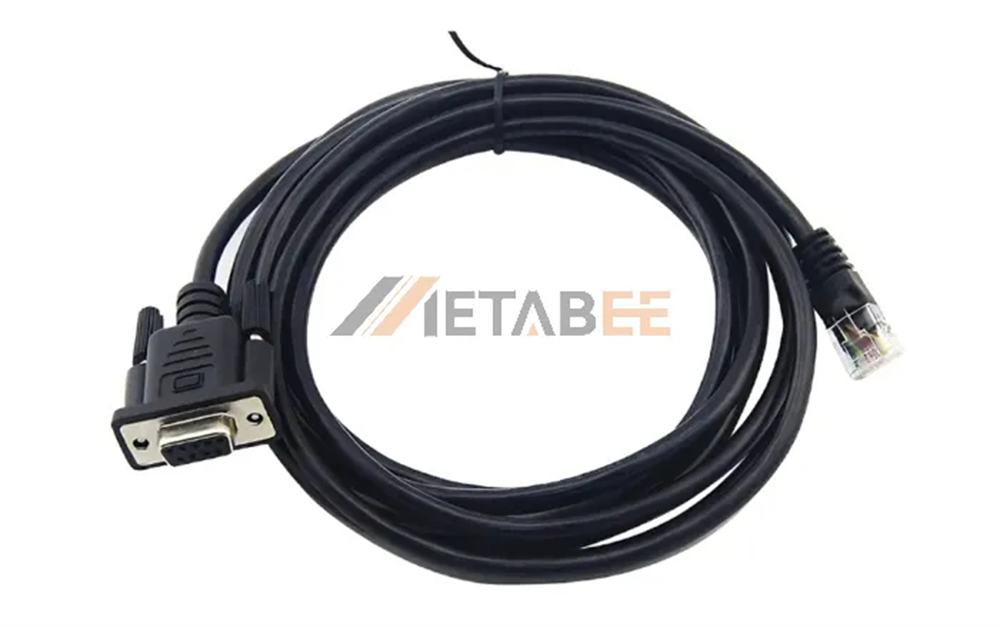
Metabee DB9 Female to RJ45 Male RS232 Cable
DB9 to RJ45 Cable Pinout and Wiring Diagram
DB9 to RJ45 cable for RS232 communication does not follow a single standard wiring scheme. The industry mainly uses two types: Cisco Console Cable (rollover wiring) and Null modem (crossed wiring). The most common wiring standard is the Cisco rollover pinout, widely used for console connections in routers, switches, and industrial controllers.
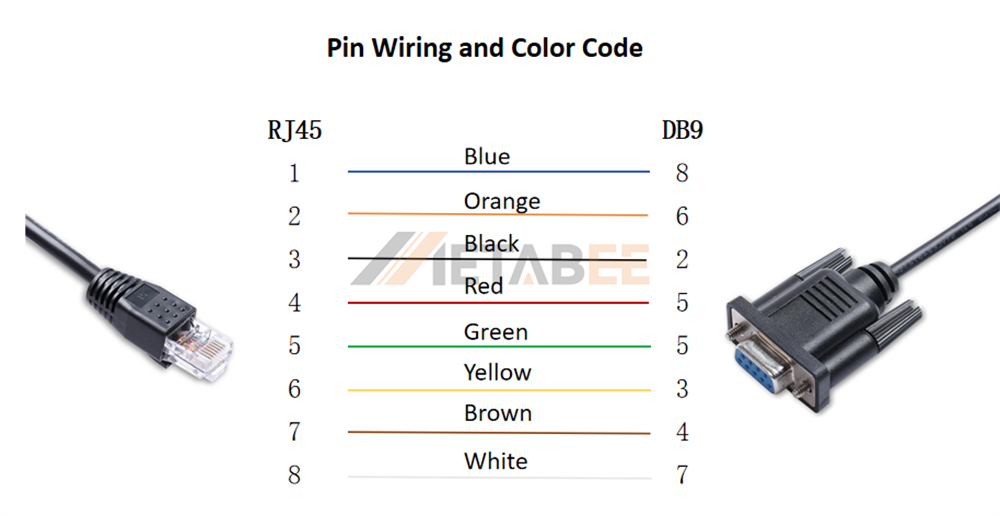
The following pinout shows a typical Cisco Console Cable wiring scheme. Actual pin assignments may vary by device manufacturer.
DB9 to RJ45 Console Cable Pinout
A standard DB9 to RJ45 console cable maps RS232 transmit, receive, and ground signals between the two connectors. The most common pin assignments are:

DB9 to RJ45 Wiring Diagram and Color Code
Why Do DB9 to RJ45 Pinouts Differ?
There is no industry standard for assigning RS232 signals to RJ45 pins. The RS232 standard defines signals such as TXD, RXD, RTS, CTS, and GND, but it does not define their positions on an RJ45 connector. As a result, manufacturers use different pin assignments for different devices.
DB9 to RJ45 cables also support various applications, and each application may require different wiring. Cisco console cables, industrial RS232 devices, PLCs, and serial servers often use different pinouts. Some connections use straight-through wiring, while others require null modem wiring.
|
Application |
Pinout Type |
|
Cisco Console Cables |
Vendor-specific |
|
Industrial RS232 Devices |
Manufacturer-specific |
|
Straight-Through Connections |
TX and RX remain aligned |
|
Null Modem Connections |
TX and RX are crossed |
This is why two DB9 to RJ45 cables can use completely different wiring while both function correctly.
Always verify the required signal mapping before selecting a cable. For devices that use proprietary or non-standard pin assignments, Metabee provides custom DB9 to RJ45 cables built to your exact wiring requirements. Contact Us Now!.
Straight-Through vs Null Modem Wiring
In addition to different pin assignments, DB9 to RJ45 cables may use either straight-through or null modem wiring. The key difference is that a straight-through cable keeps transmit and receive signals in the same direction, while a null modem cable crosses these signals. Choosing the wrong wiring type can prevent devices from communicating even when the connectors and pinouts appear correct.
Straight-Through DB9 to RJ45 Pinout
A straight-through cable keeps the transmit and receive signals in the same direction.
|
Signal |
Connection |
|
TxD |
TxD |
|
RxD |
RxD |
|
GND |
GND |
This configuration typically connects a DTE device to a DCE device, such as a PC to a modem, serial converter, or communication gateway.
Use a straight-through cable when the device documentation specifies this wiring type. It supports direct signal mapping between connected devices.
DB9 to RJ45 Null Modem Pinout
A null modem cable crosses the transmit and receive signals. Some designs also cross hardware handshaking signals such as RTS and CTS.
|
Signal |
Connection |
|
TxD |
RxD |
|
RxD |
TxD |
|
GND |
GND |
This configuration allows two similar devices to communicate directly without a modem or converter between them.
Common applications include:
- PC-to-PC communication
- Controller-to-controller communication
- Serial device testing
- Legacy RS232 equipment
Use a null modem cable when the device documentation specifies a DB9 to RJ45 null modem pinout or when communication requires crossed TX and RX signals.
When selecting a DB9 to RJ45 cable, always verify whether the application requires straight-through or null modem wiring. Two cables may use the same connectors and pin assignments but still fail to communicate if the wiring type is incorrect.
Applications of DB9 to RJ45 Cables
DB9 to RJ45 cables appear in many serial communication systems. Manufacturers often use RJ45 connectors because they are compact, cost-effective, and easy to integrate into equipment designs.
In industrial automation, these cables connect PLCs, HMIs, serial servers, and controllers. The RJ45 interface reduces panel space while still supporting RS232 communication.
In networking equipment, many switches, routers, and firewalls use RJ45 console ports for device configuration and maintenance. A DB9 to RJ45 cable allows engineers to connect a computer's serial port to the console interface.
DB9 to RJ45 cables are also common in embedded systems and legacy equipment. Many older devices still rely on RS232 communication, while newer designs prefer RJ45 connectors for convenience and standardization.
Different industries often develop their own wiring conventions and signal assignments. As a result, DB9 to RJ45 pinouts can vary significantly between networking equipment and industrial control systems.
How to Choose the Right DB9 to RJ45 Cable?
Not all DB9 to RJ45 cables use the same wiring. Choosing the right cable helps avoid communication errors and installation delays.
1. Verify the Required Pinout
Start by checking the device documentation. Different manufacturers often use different RJ45 signal assignments. A cable designed for one device may not work with another.
2. Select the Correct Wiring Type
Determine whether the application requires straight-through or null modem wiring.
- Straight-through wiring keeps signals in the same direction.
- Null modem wiring crosses transmit and receive signals.
3. Confirm the Connector Gender
Check whether the device requires a DB9 male or DB9 female connector. Connector gender affects physical compatibility.
4. Consider the Installation Environment
Industrial environments often expose cables to vibration, noise, and electromagnetic interference. In these applications, shielded cables can improve communication reliability.
5. Choose a Custom Cable When Necessary
Some devices use proprietary pin assignments. In these cases, a standard cable may not work.
Metabee offers custom DB9 to RJ45 cables with customer-defined pinouts, connector genders, cable lengths, and shielding options. Contact us for a custom cable solution.
Conclusion
There is no universal DB9 to RJ45 cable pinout. The correct wiring depends on the device, application, and communication requirements.
While DB9 and RJ45 are widely recognized interfaces, manufacturers use different RS232 wiring schemes for different applications. Two cables may look identical on the outside but use completely different signal mappings internally. For this reason, successful RS232 communication depends on more than matching connectors.
Always verify the pinout, confirm the wiring standard, and select the cable according to the target device. When it comes to DB9 to RJ45 connections, the pinout matters more than the connector.
If your device uses a non-standard wiring scheme, learn more about our custom DB9 to RJ45 cable service.
FAQs
Q1: Is there a standard DB9 to RJ45 pinout?
A: No. The RS232 standard defines signal functions but does not define how those signals map to RJ45 pins. Manufacturers often use different pin assignments.
Q2: Can I use a DB9 to RJ45 cable for Ethernet?
A: No. A DB9 to RJ45 cable typically carries RS232 serial signals, not Ethernet data. Even though both use an RJ45 connector, they are different communication systems.
Q3: Can I use a Cisco Console Cable for any RJ45 RS232 device?
A: No. RS232 over RJ45 does not follow a single standard. Cisco uses a wiring scheme called “rollover”. Other devices, such as APC UPS systems and industrial equipment, may use different pinouts. If you use the wrong cable, it may connect incorrect pins and cause communication failure or hardware issues. Always check the manufacturer’s pinout before connecting.
Q4: How can I test a custom DB9 to RJ45 cable safely before connecting it to equipment?
A: To perform this test, you need to use a PC for a local loopback test. First, disconnect the cable from the equipment. Then use a small wire to temporarily short the TX and RX pins on the connector. Next, enter commands in a terminal program such as PuTTY. If the input data is echoed back on the screen, it means the cable is working correctly and the pinout is correct.
Q5: What signals are commonly used in DB9 to RJ45 RS232 cables?
A: Most basic RS232 connections use TXD, RXD, and GND. Some devices also require RTS, CTS, DTR, and DSR signals.
