
In a world dominated by sleek USB-C ports and seamless wireless connections, it's easy to overlook the legacy hardware that paved the way for modern communication. But if you’ve ever had to troubleshoot an industrial machine or work on an older PC, you’ve likely come across a D-shaped port with nine pins. This is the DB9 connector, a workhorse of serial communication and a cornerstone of computing history.
This article serves as your comprehensive guide to the DB9 connector. We will not only define what it is and explain its crucial role, but we will also dive into its technical specifications. Besides, we will explore its historical and modern applications, and compare it to its siblings in the D-sub family. Whether you are a curious tech enthusiast, an engineer in the field, or an IT professional, understanding the DB9 is key to appreciating the evolution of data connectivity.
What is a DB9 Connector?
At its core, a DB9 connector is a type of D-subminiature electrical connector with 9 pins or sockets. While it is almost universally known as DB9, its technically correct name is DE9. The name provides a simple and logical breakdown of its physical characteristics:
- D: Refers to the connector's distinctive D-shape. This shape is not merely for aesthetics; it's a crucial design feature that ensures the connector can only be plugged in one way, preventing incorrect orientation and potential pin damage.
- E: This letter indicates the connector's shell size, which is the smallest in the D-sub family. This shell size is designed to accommodate nine pins.
- 9: The number "9" is the most direct and functional part of the name, specifying that this particular connector has nine pins (for a male connector) or nine sockets (for a female connector).
Historically, the DE9 connector's primary role was in asynchronous serial communication, a method of transmitting data one bit at a time. It became a ubiquitous interface for the RS-232 standard, which defined the electrical characteristics and functions of the signals used for communication between a computer (Data Terminal Equipment or DTE) and a peripheral device (Data Communication Equipment or DCE).
Related Post: What is D-Sub? A Comprehensive Guide to D-Sub Connectors
DB9 Connector Pinout and Key Features
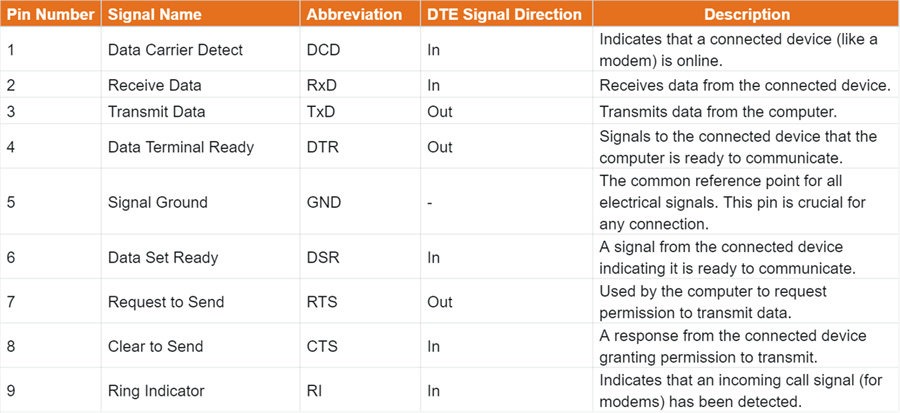
The true power of the DB9 connector lies in its standardized pinout, which enables devices from different manufacturers to communicate reliably. The pinout is a critical roadmap that defines the purpose of each of the nine pins.
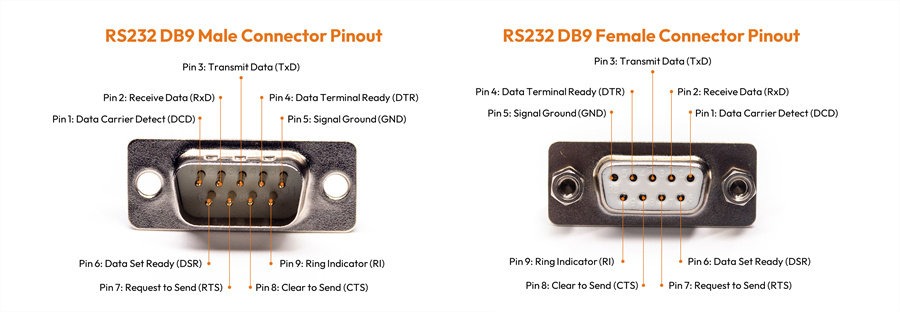
While there are some variations, the most common pinout for an RS-232 serial port is as follows:
Related Post: DB9 Pinout: The Secret Language of Serial Ports Decoded
Handshaking and Flow Control
The pins beyond the basic TXD, RXD, and GND are used for handshaking, a process that ensures a stable and efficient data flow between two devices. Signals like RTS (Request to Send) and CTS (Clear to Send) are a form of hardware flow control. This prevents one device from "overwhelming" the other by sending data faster than it can be processed. This is especially vital in environments where data integrity is paramount, such as in industrial automation.
Gender and Termination
DB9 connectors come in two genders: male (with pins) and female (with sockets). Typically, the serial port on a computer is male, while the cable connecting to a peripheral is female. For connecting two computers, a null modem cable is used, which crosses the TXD and RXD pins to allow direct communication.
The way the wires are attached to the pins is known as termination. The most common types include:
- Solder Cups: Wires are soldered directly into small cups on the back of the connector. This is the most robust and permanent method.
- Crimp Pins: Wires are crimped onto pins, which are then inserted into the connector housing. This is a faster, more flexible method for custom cables.
- IDC (Insulation Displacement Connector): A tool is used to force ribbon cables directly into the connector, piercing the wire insulation to make contact. This is ideal for mass production.
Common Applications of the DB9 Connector
While its glory days in consumer electronics may have passed, the DB9 connector remains indispensable in numerous specialized fields because it has a robust design and a reliable communication standard.
Industrial Automation and Control Systems
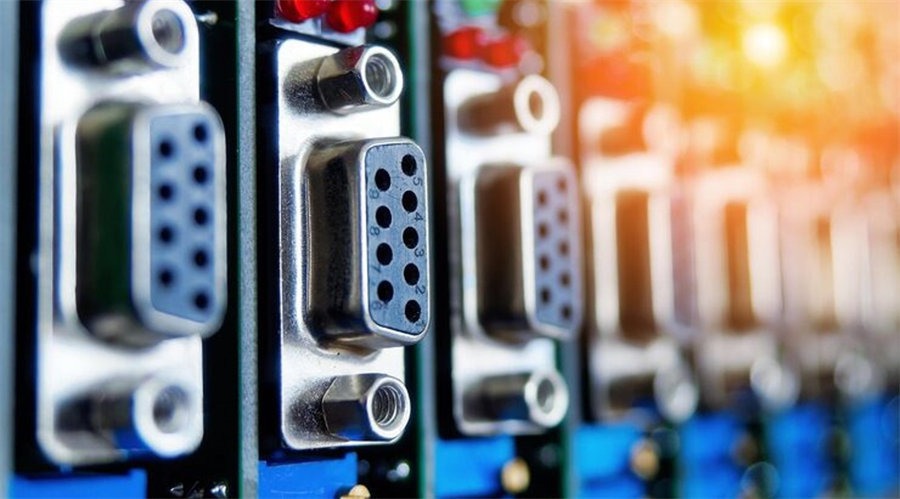
In factory automation, DB9 connectors are the lifeblood of communication between programmable logic controllers (PLCs), human-machine interfaces (HMIs), and other machinery. The RS-232 standard, with its point-to-point architecture and reliable handshaking, is perfect for transmitting critical control commands and sensor data over short to medium distances. The physical robustness of the DB9's metal shell provides a secure connection. So, they can withstand the vibrations and electromagnetic interference common in industrial environments.
Networking and Telecommunications
Network administrators and engineers rely heavily on the DB9 for console access to networking devices. Many routers, switches, and firewalls come equipped with a console port that uses a DB9 connector. By connecting a computer to this port via a console cable, an administrator can establish a direct, out-of-band management connection. This allows them to configure the device, troubleshoot issues, and perform maintenance, even when the network itself is down.
Test and Measurement Equipment
Scientific and engineering fields continue to use the DB9 for its simplicity and reliability. Oscilloscopes, data loggers, multimeters, and various diagnostic tools often feature a DB9 port for data transfer to a PC for analysis. In the automotive industry, legacy systems sometimes use the DB9 for on-board diagnostics (e.g., OBD-I).
Computer Peripherals and Legacy Systems
The DB9 was once the go-to port for connecting a wide array of peripherals to personal computers. Classic serial mice, modems, and early digital cameras all used the DB9 port. Although modern devices have migrated to USB, the DB9 is still present on some motherboards and specialized expansion cards to maintain compatibility with older, mission-critical equipment.
Gaming and Specialty Devices
For vintage computer and console collectors, the DB9 is a familiar sight. It was the standard port for joysticks and gamepads on systems like the Atari 2600, Atari 5200, Commodore 64, and Sega Master System. While the pinouts for gaming were different from RS-232, the physical form factor remained the same, showcasing the connector's versatility.
DB9 vs. Other D-sub Connectors: A Quick Comparison
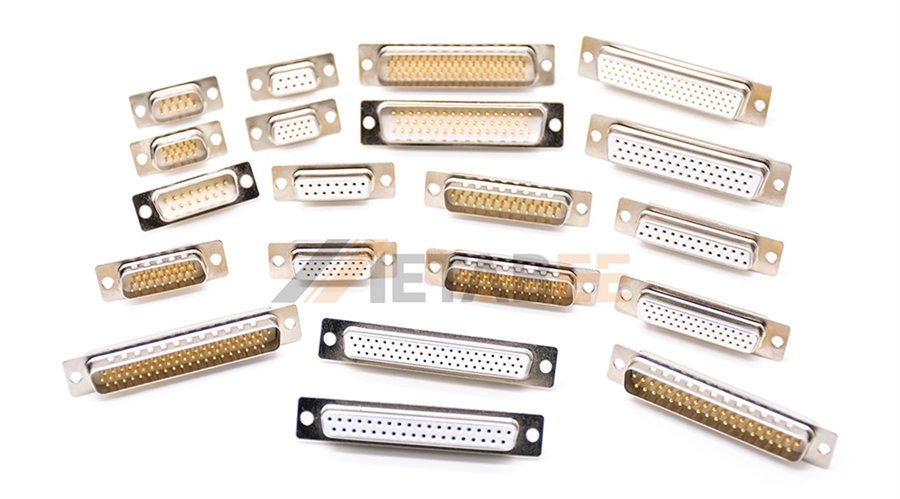
The DB9 connector is just one member of the larger D-subminiature family, which is identified by its signature D-shaped metal shell.
Other common D-sub connectors include:
- DB25: This connector is a close relative of the DB9, using the 'B' shell size with 25 pins. It was famously used for parallel ports on PCs, connecting printers and scanners. While both the DB9 and DB25 could be used for RS-232, the DB9's compact size made it more popular for simple serial applications that didn't require all 25 signal lines.
- DA15 (DB15): With an 'A' shell size, the DA15 connector was used for joystick ports on some PC sound cards.
- HD15 (DE15 or VGA): This is a high-density 15-pin connector that is widely known for its use with VGA analog video signals. The pins are arranged in three rows, allowing it to fit into a more compact shell than the standard 15-pin DA15 connector. This distinction is important as the HD15 is designed specifically for video, while other D-sub connectors are for data.
- DC37 (DB37): This larger connector uses the 'C' shell and 37 pins. It was commonly used for SCSI devices and some older telecommunications equipment.
- DD50 (DB50): The largest standard D-sub connector, the DD50, uses the 'D' shell with 50 pins. It found use in high-density connections, particularly for network hardware and older computer systems.
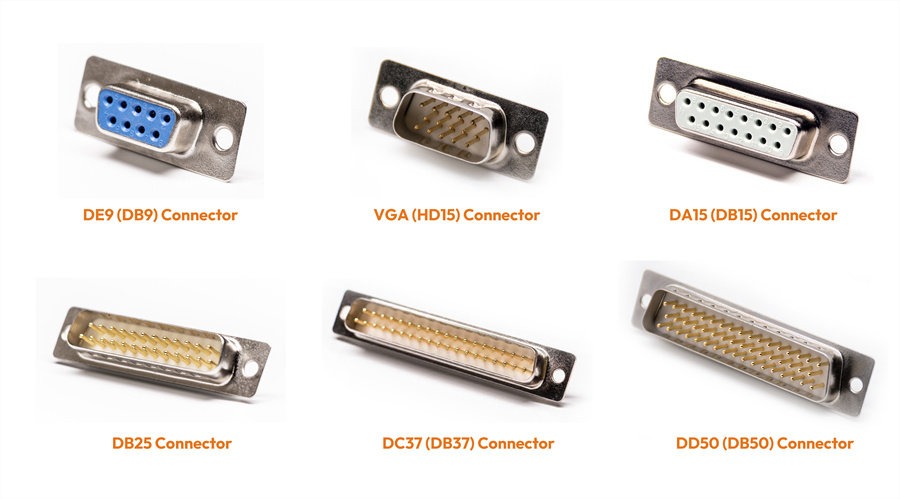
The naming convention of these connectors can be a bit confusing. It's a common misconception to call every D-sub connector a "DB" connector. The first letter (D) always indicates a D-sub connector, while the second letter (A, B, C, D, E) indicates the shell size. The shell sizes determine the maximum number of pins it can hold. For example, a DE9 connector, always known as DB9 connector, has a E-size shell with 9 pins.
Conclusion: The Enduring Legacy of the DB9
The DB9 connector is a testament to the principles of simplicity, robustness, and reliability in hardware design. It has been supplanted by faster and smaller interfaces in the consumer market. But its legacy and continued relevance in industrial, professional, and legacy applications are undeniable. It serves as a crucial link, bridging the gap between powerful modern computers and the tried-and-true machines that keep the world running. The next time you see that iconic D-shaped port, you'll know that you're looking at more than just a piece of old technology—you're looking at a connector that played a key role in the history of data communication and continues to be essential today.
Looking for high-quality DB9 connectors and cables for your project or product? Explore our extensive selection designed for reliability and performance.
Frequently Asked Questions (FAQ)
Q: What is the difference between a DB9 and a DE9 connector?
A: the same. The term "DB9" is the most commonly used name, but "DE9" is the technically correct designation. The "D" signifies the connector's D-shape, the "E" denotes its specific shell size, and the "9" indicates it has nine pins.
Q: Why is the DB9 connector still in use today?
A: Despite being a legacy technology, the DB9 connector is still widely used in industrial automation, networking, and telecommunications because of its simplicity, robustness, and reliable serial communication standard (RS-232). It provides a secure, hard-wired connection that is less susceptible to interference than modern interfaces.
Q: How is the DB9 connector's pinout structured?
A: The standard DB9 pinout is designed for RS-232 serial communication. The most important pins are TXD (Transmit Data), RXD (Receive Data), and GND (Signal Ground). Other pins, such as RTS (Request to Send) and CTS (Clear to Send), are used for handshaking and flow control.
Q: Is a DB9 connector the same as a VGA connector?
A: No, they are not the same. While they are both D-sub connectors, a VGA port is technically an HD15 connector, which has 15 pins arranged in three rows for transmitting analog video signals. A DB9 connector only has nine pins and is designed for serial data communication.
Q: What is the purpose of a null modem cable?
A: A null modem cable is a special type of serial cable used to directly connect two computers or DTE devices together. It works by crossing the transmit and receive lines (TXD to RXD and vice versa), allowing them to communicate without the need for a modem or other intermediate device.
Q: What is the difference in application between a DB9 and a DB25 connector?
A: Both are D-sub connectors, but the DB25 has 25 pins and was famously used for parallel ports, primarily for connecting printers. The DB9, with its nine pins, was the standard for serial ports, used for devices like mice, modems, and networking equipment.
Q: What is "handshaking" in the context of DB9 communication?
A: Handshaking is a method of flow control that ensures data is transmitted and received smoothly between two devices. Pins like RTS and CTS are used by the devices to signal if they are ready to send or receive data, preventing one device from sending data faster than the other can process it.
Q: How can I tell the difference between a male and a female DB9 connector?
A: A male DB9 connector has pins (the protruding metal parts), while a female connector has sockets (the holes) that the male pins plug into. The male connector is typically found on the device or computer, and the female connector is on the cable.
Q: What does the "D" in D-sub stand for?
A: The "D" in D-sub stands for "D-shaped." This refers to the distinctive shape of the connector's metal shell, which ensures that the connector can only be plugged in one way, preventing incorrect orientation.
